Core Rules01. Core Concepts
changed01.02Units and Models
A unit can contain one or more models. These models move and fight together as a single group. Most models have a base, which is also part of that model for all rules purposes.
Rules sometimes affect ‘friendly’ or ‘enemy’ models or units, which are defined as follows:
- Friendly units and models are those in your army.
- Enemy units and models are those in your opponent’s army.
If a rule affects units or models without specifying that they are friendly or enemy, that rule affects any unit or model, regardless of whose army they are in. When an effect or ability applies to a unit, it applies to every model in that unit.
01.02.01 - Starting Strength and Half-Strength
The number of models a unit contains at the start of the first battle round is its starting strength. The starting strength of an attached unit is the number of models that unit contains at the start of the first battle round.
Some rules refer to units being below starting strength, or at – or below – half‑strength. The meaning of these terms varies depending on a unit’s starting strength, as shown below.
| STARTING STRENGTH OF 1 | STARTING STRENGTH OF 2 OR MORE | |
|---|---|---|
| BELOW STARTING STRENGTH | Model's remaining wounds are less than its W characteristic. | Number of remaining models in the unit is less than its starting strength. |
| AT HALF-STRENGTH | Model's remaining wounds are half of its W characteristic. | Number of remaining models in the unit is half of its starting strength. |
| BELOW HALF-STRENGTH | Model's remaining wounds are less than half of its W characteristic. | Number of remaining models in the unit is less than half of its starting strength. |
Example: A Captain (1 model) is attached to a unit of Intercessors (5 models). This attached unit has a starting strength of 6. If three Intercessors were destroyed, the unit would be at half‑strength. If four Intercessors were destroyed, the unit would be below half‑strength. If all of the Intercessors were destroyed, the remaining Captain would be below half‑strength, despite having his full wounds remaining.
01.02.02 - Persisting Rules Effects
Some rules apply an effect that lasts until a certain duration has passed (e.g. until the start of your next turn). Such effects are known as persisting effects.
If a persisting effect applies to a unit when you place it in strategic reserves or when it embarks within a TRANSPORT, make a note of that effect and its duration; if that unit is set up on the battlefield again, any persisting effects continue to apply to that unit for their full duration.
If you have a rule that specifies when it is triggered (e.g. 'In the Shooting phase') and it does not specify how long it is active for, it is only active for the duration of that specified period (e.g. until the end of that Shooting phase). After that period, that effect is no longer applicable/active.
If a rule or effect is given to a unit and it does not specify how long it is active for, it is only active for the phase in which it was given.
01.02.03 - Revived and Adding Models to a Unit
When a rule revives, resurrects, returns or adds models to a unit, the specified number of models are added to the unit.
- If a rule revives, resurrects or returns models to a unit, it does so through destroyed models from that unit.
- This cannot expand a unit beyond its starting strength.
- Unless otherwise stated, such models are added with all wargear and enhancements they started the battle with, and with their full W remaining.
Models returned to a unit on the battlefield must be set up as follows:
- They must be set up in coherency with models in that unit that started that phase on the battlefield.
- They can be set up engaged with one or more enemy units, but only if those enemy units were already engaged with the unit that model is being returned to.
If a leader or support model in an attached unit is destroyed and subsequently revived, they are still part of that attached unit and they must be returned to it if possible.
When a model revives, resurrects, returns or is added to an embarked unit, if that TRANSPORT has sufficient remaining transport capacity for that model, that model is returned to that unit and is embarked. Otherwise, that model is destroyed, but it does not trigger rules that apply when a model is destroyed.
01.02.04 - Not On The Battlefield
A unit that is embarked within a TRANSPORT or that is in strategic reserves is not on the battlefield. The following applies to such units:
- That unit is not visible to any other units (units are visible to themselves).
- Any other unit is not visible to that unit.
- Players cannot measure distances to or from that unit (units are within range of their own abilities).
This means units not on the battlefield cannot be selected or targeted by any attack or rule that requires a unit to be visibleor within a certain distance (other than their own abilities).
Such units can still use their other rules, and are still units in the controlling player's army and so can be affected by rules that require a player to select a unit from an army, as well as rules that affect all units in an army.
The controlling player must make battle-shock rolls for units that are not on the battlefield in their Command phase if they are battle-shocked, or if they are at or below half-strength.
01.02.05 - Other Model / Unit
When a rule refers to models or units ‘other’ than the one with that rule (or one already mentioned by that rule), it means a different model or unit to that original one.
Different instances of the same datasheet are still considered to be ‘other’ units.
01.02.06 - Splitting Units
Some rules allow you to split units into smaller units (e.g. the Transport ability of Drukhari Venoms). When using such rules:
- The same models can only be subdivided in this way once (e.g. those smaller units cannot themselves be split further).
- If a rule is used to split a unit into multiple units before the battle, the starting strength of each individual unit is changed to be equal to the number of models in that unit.
01.02.07 - Describing Units
When a rule mentions a unit, it may have a descriptor for the unit (e.g. Terminator unit, hidden unit, battle-shocked unit, visible unit, controlling unit). For such descriptors to apply to a unit, that unit must have at least one model in that unit that meets that descriptor.
This does not give that rule to every model in the unit, unless that rule specifically states that it gives that rule to the unit, in which case every model in that unit gains that rule, as described in Units and Models (01.02).
Example: A hidden unit would be a unit that has a model in it that is hidden.
01.02.08 - A (Unit/Model/Object)
Some rules may refer to 'a' unit/model/object without specifying an exact number. In such cases, the meaning is 'one or more', rather than exactly one.
Example: If a rule has a condition that requires a unit to be 'within range of an objective', that condition is still met if that unit is within range of more than one objective.
01.02.09 - Tokens
Tokens are gaming aids that some rules instruct you to place next to model/unit to remind you and your opponent that a model/unit either has a limited-use ability or is under the effects of a particular rule. Tokens are not counted as models for any purposes (even if they are being represented by a model). If another model needs to move into the space occupied by a token, reposition the token to allow that move to be made.
01.02.10 - Adding a new unit to your army
Some rules add a new unit to your army during a battle. That unit’s starting strength is determined when it is added to your army, but is otherwise determined in the same way as for other units.
01.02.11 - All Types of Model
When a rule mentions ‘all types of model’, this is inclusive of friendly and enemy models and all keywords, e.g. MONSTER/VEHICLE models.
changed01.04Measuring Distances
Distances in Warhammer 40,000 are measured in inches ("). You can measure distances whenever you want to.
When a rule refers to a model’s position in relation to anything else on the battlefield, unless otherwise stated, measure to or from the closest part of that model’s base.
01.04.01 - Within / Wholly Within
Rules in Warhammer 40,000 will often apply to models or units that are within or wholly within a certain distance. The following definitions explain what these terms mean:
- Within: If a rule says it applies ‘within’ a specified distance, it applies at any distance that is not more than that distance. For example, within 1" means any distance that is not more than 1" away
- Model/Unit Within: A model is within a specified distance if any part of its base is within that distance. A unit is within a specified distance if one or more of its models are within that distance.
- Model/Unit Wholly Within: A model is wholly within a specified distance if every part of its base is within that distance. A unit is wholly within if every model in that unit is wholly within the specified distance. A model with the frame keyword is wholly within a specified distance if all parts of that model are within the specified distance.
Example: A model is wholly within a terrain area if no part of its base extends beyond the footprint of that terrain area. A unit is wholly within a specified distance if every model in that unit is wholly within that distance.
01.04.02 - Closest Or Nearest Model/Unit
When a rule refers to the closest or nearest model or unit, this is the closest model or unit to the model or unit using that rule.
If two or more are equally close, the controlling player of the model or unit using that rule selects which is the closest for the purposes of that rule.
01.04.03 - As Close As Possible
If a rule instructs you to move a model as close as possible to a unit or model you must end that model’s move in base contact with that unit or model if its move is sufficient to do so without breaking any other restrictions (such as coherency), or as close as you can achieve if its move is not sufficient.
- If a model is already as close as possible to a unit or model when it is instructed to make a move as close as possible towards a unit or model, that model cannot be moved, but still counts as having made the move in question.
If a rule instructs you to move a model as close as possible to an objective you must end that model’s move within range of an objective if its move is sufficient to do so without breaking any other restrictions (such as coherency), or as close as you can achieve if its move is not sufficient.
- If that model is already within range of an objective it can move up to the maximum distance of that move but must end its move still within range of that objective.
01.04.04 - Base Contact or Base to Base Contact
When two models’ bases are touching, they are in base contact – also known as base-to-base contact – and are as close as possible (01.04.03).
When moving a model from your army into base contact with an enemy model during a move, if that enemy model overhangs its base such that it is not physically possible to be in base contact with that model, until the end of the turn, those models are considered to be in base contact with each other while all of the following are true:
- The distance your model could move was sufficient to move it into base contact with the enemy model if there was no overhang.
- The models are as close as possible together.
- Any part of one model is within 1" of any part of the other model.
01.04.05 - Table Quarters
When a rule refers to a table quarter, or table quarters, divide the battlefield with imaginary lines 1mm thick drawn lengthwise and widthwise through the centre of the battlefield to create four equal rectangles. These rectangles are the table quarters.
Core Rules02. Datasheets
changed02.02Profiles
These contain the following characteristics that tell you how mighty the models in the unit are:
Move (M): The speed at which a model traverses the battlefield. If a model has an M characteristic of ‘-’, it can be set up on the battlefield but otherwise cannot be moved.
Toughness (T): The model’s resilience against harm.
Save (Sv): Presented as a dice result (e.g. 4+), this indicates the protection a model’s armour gives it.
Invulnerable Save (InSv): Presented as a dice result (e.g. 4+). Some models are protected by esoteric means in addition to physical armour, such as force fields or preternatural reflexes. Not all models have an InSv characteristic, but if they do, it will be listed here.
Wounds (W): Wounds represent how much damage a model can sustain before it is destroyed. If a model’s wounds are reduced to 0 or fewer, that model is destroyed.
Leadership (Ld): Presented as a dice result (e.g. 7+), this reveals how courageous, determined or self‑controlled a model is.
Objective Control (OC): How effectively a model can control an objective on the battlefield. If a model has an OC characteristic of ‘-’ it is unable to control objectives at all.
02.02.01 - Modifiers
WHAT ARE MODIFIERS?
Many rules in the game modify a value, characteristic or roll elsewhere in the game. A rule that does so is known as a modifier. A value that has been changed is a modified rule (e.g. modified characteristic, modified roll, modified value, etc).
One of the most common ways for modifiers to be presented is as +1 or -1 to a characteristic, roll or value.
If the rule has +1 to a characteristic, it improves it by the value after the '+' symbol.
Example: 'This weapon has +1 AP' would improve an AP characteristic of -2 to -3.
If the rule has -1 to a characteristic, it worsens it by the value after the '-' symbol.
Example: 'This unit has -1 Sv' would worsen a Sv characteristic of 3+ to 4+.
APPLYING MODIFIERS
This section presents the various ways rules may be modified. All modifiers are cumulative.
When a value is modified (e.g. characteristic, dice roll, distance), do so in the following order.
1. If a rule instructs you to change or replace one value with a specified value, you must first change the relevant value to the new value.
Note that rules that modify a characteristic in this step to a new value of ‘0’, ‘-’ or ‘*’ cannot be modified by other rules (in such cases, skip steps 2-5).
2. Apply multiplication modifiers.
3. Apply addition modifiers.
4. Apply division modifiers.
5. Apply subtraction modifiers.
6. Round any fractions up after applying all modifiers.
WHEN MODIFYING CHARACTERISTICS
When modifying characteristics, unless otherwise stated, the following points also apply:
- Characteristics of ‘-’, ‘*’ and ‘N/A’ can never be modified.
- Rules that modify a model’s WS and/or BS characteristic modify the WS and/or BS characteristic of every weapon equipped by that model.
- After all modifiers have been applied:
- M cannot be less than 1".
- T cannot be less than 1.
- Sv cannot be 1+ or better.
- InSv cannot be 1+ or better.
- Ld cannot be 4+ (or better) or 9+ (or worse).
- OC cannot be less than 0 or '-'.
- Range characteristics cannot be less than 1".
- A cannot be less than 1.
- WS cannot be 1+ (or better) or 7+ (or worse).
- BS cannot be 1+ (or better) or 7+ (or worse).
- S cannot be less than 1.
- AP cannot be worse than 0.
- D cannot be less than 1.
When these terms are used in rules, the affected characteristics are being modified, and the following points apply:
- Improving WS, BS, Sv and Ld: When improving a WS, BS, Sv or Ld characteristic, subtract the appropriate amount from the number before the plus sign, e.g. improving a WS of 3+ by 1 would result in a WS of 2+.
- Worsening WS, BS, Sv and Ld: When worsening a WS, BS, Sv or Ld characteristic, add the appropriate amount to the number before the plus sign, e.g. worsening a WS of 3+ by 1 would result in a WS of 4+.
- Improving AP: When improving an Armour Penetration characteristic, subtract the appropriate amount from the characteristic, e.g. improving an AP of -1 by 1 would result in an AP of -2; improving an AP of 0 by 1 would result in an AP of -1.
- Reducing or Worsening AP: When reducing or worsening an Armour Penetration characteristic, add the appropriate amount to the characteristic, to a maximum of 0, e.g. reducing/worsening an AP of -1 by 1 would result in an AP of 0; reducing /worsening an AP of 0 by 1 would result in an AP of 0.
- Improving or Worsening Other Characteristics: When instructed to improve/worsen a characteristic that does not include a ‘+’ or ‘-’ symbol, add/subtract the specified amount to/from that characteristic (e.g. to improve a S by 1, add 1 to it).
WHEN MODIFYING DICE ROLLS
When modifying dice rolls, the following points also apply:
- Modifiers are applied after any re-rolls of that dice roll.
- Rules that refer to the value of an ‘unmodified’ dice roll are referring to the dice result after any re-rolls, but before modifiers.
- A dice result can be modified above its maximum possible value (for example, a D6 roll can be modified above 6).
- A result that would be less than 1 is changed to a result of 1.
- Hit rolls and wound rolls can never be modified by more than -1 or +1. After all the cumulative modifiers to such a roll have been calculated, if the total modifier would be:
- -2 or worse, it is changed to -1.
- +2 or better, it is changed to +1.
- Charge rolls cannot be greater than 12. After all the cumulative modifiers to a charge roll have been calculated, if the result would be 13 or more, it is changed to 12.
OTHER MODIFIED RULES
The following rules apply to various rules and effects found throughout the game.
- Detection range and Lone Operative cannot be better than 9" or worse than 30".
A stratagem cannot have its CP increased by more than 1 or reduced to below 0 after all modifiers have been applied.
02.02.02 - Ignore Modifiers
Some rules enable a player, weapon, model or unit to ignore modifiers. When using such rules, the following points apply:
Unless otherwise stated, that rule allows you to ignore modifiers to the unit's rolls and the unit's profile and weapon characteristics.
When a rule states you can ignore modifiers to a stated roll or characteristic, you can choose to ignore all of those modifiers, or only some of them. For example, you can still choose to apply positive/beneficial modifiers while ignoring negative/detrimental modifiers.
Example: Your unit can ignore characteristic modifiers and is under the effect of +2" M and -2" M. You can choose to ignore the -2" M, meaning that unit's M characteristic will only be modified by the +2" M.
Example: Your unit's ranged attacks can ignore roll modifiers and are under the effect of +1 to hit rolls and -1 to hit rolls. You can choose to ignore the -1 to hit rolls, meaning those attacks will only be affected by the +1 to hit rolls.
02.02.03 - Random Characteristics
Random Movement: When a unit with a random M characteristic is selected to move, determine the entire unit’s move distance by rolling the indicated number of dice.
Random Attacks: If a weapon has a random A characteristic, that characteristic is determined when generating attacks for that weapon at the Resolve Attacks step (04.03). If several weapons with random A characteristics are making identical attacks, generate the attacks for each of those weapons individually, and group them all together.
Random Damage: If a weapon has a random D characteristic, then each time an attack made with it inflicts damage, the controlling player determines that weapon's characteristic when the opposing player has selected a model in the target unit to allocate that attack to.
When determining a random D characteristic, the dice roll made is called a damage roll.
Where a D characteristic includes an operator (e.g. a ‘+’, as in D6+1), the value after the operator is part of that D characteristic – it is not a modifier.
Other Random Characteristics: For all other characteristics, roll to determine the value on an individual, per-model or per-weapon basis each time that characteristic is required.
02.02.04 - Healing Or Regaining Lost Wounds
When a unit heals or regains a number of wounds, it regains up to that number of lost wounds. For each wound healed or regained, consult the following:
- If that unit has one or more models that does not have its full wounds remaining, select one of those models; that model regains one lost wound.
- If all models in that unit have their starting number of wounds, but one or more models from that unit are currently destroyed, revive one of those destroyed
models,models (excluding Character models), with one wound remaining.
This cannot cause a model to have more wounds remaining than it started the battle with.
If a rule states that a model heals or regains a number of wounds, only that model can regain wounds up to its starting number of wounds. Any excess regained wounds are lost and do not cause a destroyed model from that unit to revive.
02.02.05 - Full Wounds Remaining
A model has its full wounds remaining if it has the same number of wounds remaining as its W characteristic.
Core Rules03. Moving
changed03.02Set Up
Before your units can move and make attacks, they will first need to be set up on the battlefield. This most commonly happens when deploying your army for battle, but can happen for other reasons as well.
Whenever a rule instructs you to set up a unit, place its models on the battlefield so that:
- That unit is in coherency (03.03).
- That unit is unengaged (03.04).
- All other requirements and restrictions are met.
If you cannot set up all of the models in a unit, remove that unit from the battlefield and return it to its original position (e.g. in strategic reserves or embarked within a TRANSPORT)
03.02.01 - If You Cannot Set Up a Unit
While having to set up a unit as the result of a move type, if you have to return a unit’s models to their previous positions because it is not possible to set them all up, that unit has not been selected to move. This means it can be selected to move later, so could either attempt another set up or remain stationary (09.04).
03.02.02 - Setting Up Large Models
If a model cannot meet all of its set up restrictions because it is too large, consult the relevant section below:
During Deployment: If a model is so large that its base cannot physically be set up wholly within your deployment zone, it must be set up so that it is touching your battlefield edge. During a turn in which such a large model is set up on the battlefield, that model’s unit cannot do any of the following:
- Make a normal/advance/fall-back/charge move.
- Make any attacks with ranged weapons.
Some large models, typically Aircraft, have wings and other parts that extend significantly beyond their base. Such models can overhang a deployment zone if it is not possible to set them up otherwise, but when setting them up, their base must still be wholly within that deployment zone.
From Strategic Reserves: If a model is so large that its base cannot physically be set up wholly within the distance required of the battlefield edge, it must be set up so that it is touching a battlefield edge. During a turn in which such a large model is set up on the battlefield,battlefield (excluding AIRCRAFT models), that model’s unit cannot do any of the following:
normal/advance/fall-back/charge move.
Make any attacks with ranged weapons.
Some large models, typically Aircraft, have wings and other parts that extend significantly beyond their base. Such models can overhang a battlefield edge if it is not possible to set them up otherwise, but when setting them up, they must still be more than 8" away from all enemy units.
Disembarking from a Transport: When a unit disembarks from a Transport, it must be set up wholly within 3" of that model. If a disembarking model is so large that it is not possible to set it up wholly within 3" (typically because it is itself larger than 3" in all directions), set that model up with its base within 1" of that Transport’s base (or hull), and not engaged with any enemy units.
03.02.03 - Redeployments
When a player uses a rule that lets them redeploy their unit, they remove that unit from the battlefield, then deploy it again using all the normal rules (e.g. if all the models in the redeploying unit have the Infiltrators ability, that unit can be set up using that ability).
Core Rules05. Attack Sequence
changed05.03Save Rolls
The opposing player resolves the following sequence:
1. Create Groups: Divide all models in the target unit into the following groups, as many times as required:
- One group for each CHARACTER model.
- One group for all other models with the same W, Sv and InSv characteristics.
2. Allocation Order: Declare the order in which those groups will have attacks allocated to them, applying all of the following:
- If a non-CHARACTER group contains a model that has lost one or more wounds, that group must be first in the allocation order.
- No CHARACTER group can be earlier in the allocation order than a non-CHARACTER group.
- CHARACTER groups containing a model that has lost one or more wounds must be earlier in the allocation order than CHARACTER groups containing no wounded models.
3. Make Save Rolls: The opposing player makes one save roll for each attack that wounded the target by rolling one D6.
05.03.01 - Saving Throw
The term 'saving throw' is the same as save roll.
5.3.2 - Attacks Modified during Hit and Wound rolls
Some attacks may be modified as a result of the values of hit/wound rolls made for those attacks. When this happens, split those attacks into attack pools based on their new identical attack profiles. The active player can decide which attack pool to resolve first for steps 5.3 and 5.4. Once those steps have been completed for that attack pool, the active player can decide the next pool to resolve and repeat until all new attack pools are resolved.
Core Rules09. Movement Phase
new09.07.01Desperate Escape Test
Some rules may reference the term 'Desperate Escape test'. In all instances this means the hazard rolls made for the desperate escape mode of a fall-back move.
Abilities that subtract from a unit's Desperate Escape test instead subtract from those hazard rolls.
Example: A battle-shocked unit makes a fall-back move away from a unit of Bloodletters that have the Bane of Cowards ability. As a result of Bane of Cowards, because the unit making the fall-back move is battle-shocked, the hazard rolls they make as part of their desperate escape will be at -1.
new09.07.01Desperate Escape
If a stratagem or ability forces a unit to make a Desperate Escape test, that unit:
- Must make one hazard roll for each model in that unit.
- Must make a battle-shock roll.
Core Rules12. Fight Phase
changed12.08Consolidation Move
- After moving
- Ongoing Consolidation: Each model that started this move engaged with an enemy unit must still be engaged with that enemy unit.
- Engaging Consolidation: Your unit must be engaged with all of the selected enemy units. If one or more enemy units engaged with your unit have not been selected to fight this phase, your opponent must select each of those units, one at a time; when each is selected, it becomes eligible to fight and is selected to fight (12.04).
- Objective Consolidation: Your unit must be unengaged and within range of the selected objective.
Core Rules13. Terrain
changed13.11Solid
Dense terrain features have the Solid rule. Line of sight cannot be drawn across any enclosed gap in the surface of such a terrain feature that is 3" or less from ground level.
Designer’s Note: This rule ensures that models are not visible while sheltering in ground-level terrain, irrespective of small openings such as doors, windows or bullet holes, or because of small gaps between adjacent terrain features. 3" is the height of the first floor of many terrain features, but some missions may adjust the height at which this rule takes effect.
13.11.01 - Gone to Ground
Hidden models that are withinconcealed by Soliddense terrain features gain an extra benefit while they have gone to ground.
A model has gone to ground while all of the following apply:
- That model is hidden.
- That model is not fully visible to the attacking model due to one or more intervening
Soliddense terrain features. - That model’s unit did not make one or more ranged attacks during this turn or during the previous turn.
While a model has gone to ground, subtract 3" from that model’s detection range.
Designer’s Note: Units that made ranged attacks in the current or previous turn cannot go to ground, regardless of any abilities that allow them to shoot and remain hidden.
Solid
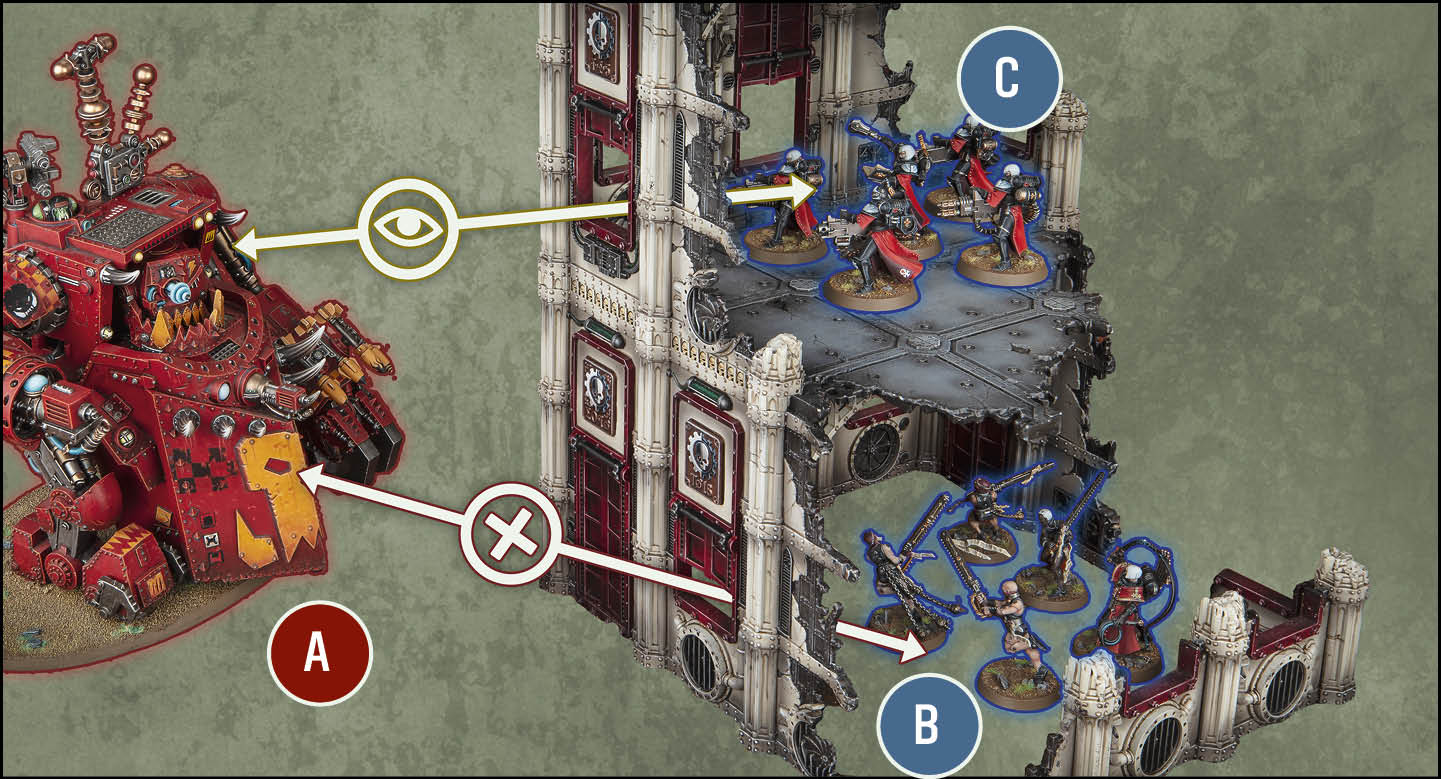
Units *A* and *B* are not *visible* to each other, because even though there is a window in this *dense* *terrain feature*, it has the *Solid* rule, so *line of sight* cannot be drawn through such enclosed gaps that are 3" or less from ground level.
Units *A* and *C* are *visible* to each other, because even though this *dense* *terrain feature* has the *Solid* rule, *line of sight* can be drawn normally through enclosed gaps that are more than 3" from ground level.
Core Rules14. Objectives
changed14.02Level Of Control
At the start of the battle, no objective on the battlefield is controlled by either player. To gain control of an objective, a player will need one or more models with an OC characteristic of 1 or more within range of it. A model is within range of a terrain objective while it is within that terrain area.
At the end of each phase and turn, to determine a player’s level of control over an objective, add together the OC characteristics of all the models in that player’s army that are within range of that objective:
- The player who has the highest level of control over that objective controls that objective.
- If both players have the same level of control over that objective, unless that objective is secured (14.03), that objective is not controlled by either player.
While one or more units from a player’s army are within range of an objective that player controls, for each of those units that contains one or more models with an OC characteristic of 1 or more, that unit is said to be controlling that objective.
14.02.01 - Controlling an Objective at the End of a Phase
At the end of each phase and turn, the first thing players do (before any other 'at the end of the phase/end of the turn' rules or abilities) is determine which objectives are controlled by which player.
Core Rules18. Transports
changed18.01Transport Capacity
TRANSPORT models have a transport capacity listed on their datasheet. This determines the type and maximum number of friendly models that are eligible to embark within them. More than one unit can be embarked within the same TRANSPORT model at the same time, provided it has sufficient transport capacity.
Before the battle, in the Declare Battle Formations step, your units can start embarked within any friendly TRANSPORT model that has sufficient transport capacity remaining for the whole unit.
A friendly unit must be embarked within each friendly DEDICATED TRANSPORT model. At the end of this step, each friendly DEDICATED TRANSPORT model without an embarked unit is destroyed, but they do not trigger rules that are triggered when a model is destroyed.
Core Rules20. Strategic Reserves
changed20.01Placing Units In Strategic Reserves
Before the battle, in the Declare Battle Formations step, you can select one or more friendly units (excluding FORTIFICATIONS) to place in strategic reserves. Instead of setting up these units on the battlefield during deployment, place them to one side; they are strategic reserves units, and will arrive later in the battle.
Unless otherwise stated, the combined points value of all of your strategic reserves units (including those embarked within TRANSPORTS that are themselves placed in strategic reserves) cannot exceed 50% of your points limit for your battle size.
20.01.01 - Reserves
The term 'Reserves' is the same as strategic reserves.
20.01.02 - Strategic Reserves at the End of the Battle
At the end of the final turn, units in strategic reserves are destroyed, but they do not trigger rules that apply when a model is destroyed. 
Core Rules24. Core Abilities
changed24.28[PRECISION]
While resolving attacks made with one or more [PRECISION] weapons, at the start of the Allocation Order step (05.03), if the target unit contains one or more CHARACTER models visible to one or more of the attacking models, the active player can select one allocation group that contains one of those visible CHARACTER models. If they do, until those attacks are resolved, or until that CHARACTER group is destroyed (whichever happens first), that CHARACTER group is the current allocation group.
24.28.01 - Precision and Devastating Wounds
Mortal Wounds inflicted by a [PRECISION] attack with the [DEVASTATING WOUNDS] ability are first applied to the CHARACTER group that was selected for those [PRECISION] attacks (if that group is not already destroyed).
changed24.37[TORRENT]
Each time an attack is made with a [TORRENT] weapon, that attack automatically hits the target.
24.37.01
[TORRENT] weapons cannot have [INDIRECT FIRE] or [PRECISION].
Core Rules25. Muster Armies
changed25.04Fill Your Army Roster
You will now select your detachments, units, warlord and enhancements that will be in your army. You will also attach your leader and support units to other units.
When doing so:
- You cannot exceed any of the values presented in the Select Battle Size table (25.03). For example, in an Incursion battle, you cannot select detachments with a combined value of more than 2 DP.
- No unit (including attached units) can have more than one enhancement.
- Your army roster must follow all restrictions placed on it by the rules and units being included in it.
SELECT DETACHMENTS
You can now use your DP to select detachments for your army. You can only select from those available to your army faction. Each one will give you access to different force dispositions, detachment rules, enhancements and/or stratagems to use in the coming battle. You cannot select the same detachment more than once. Record your selected detachments on your army roster.
Note that some detachment rules list units and other detachments that your army either must include or cannot include; you must follow all such rules when building your army for the detachments you have selected.
SELECT UNITS
Select all the units you want to include in your army. You can only select units with your faction keyword and units available to your army faction. Each time you include a unit in your army, it can take any wargear or options it has access to. Note on your army roster the number of models in the unit, any wargear and upgrades it has, and its points value.
Select one CHARACTER unit to be your Warlord’s unit. This must be a unit that has the faction keyword you chose as your army faction. Then select one CHARACTER model in that unit to be your Warlord – the supreme leader of your army – and make a note of this on your army roster. That model gains the WARLORD keyword. Some units have a rule on their datasheet stating that they must be your WARLORD. If you want to include one or more of these units in your army, you must select one of them to be your WARLORD. Rules that state that a model cannot be your WARLORD take precedence over ones that require it to be your WARLORD.
ATTACH LEADERS AND SUPPORT UNITS
For each leader and support unit in your roster, you can attach them to a bodyguard unit that they can join, following the rules for Forming Attached Units (19.01). Each support unit in your roster must be attached to a bodyguard unit.
SELECT ENHANCEMENTS
Select all of the enhancements you want to include from the detachments you selected and give each one to a different unit in your army. When you do, increase those units’ points values accordingly. The points values for enhancements can be found in the Warhammer 40,000 app.
Unless otherwise stated:
- Only CHARACTER units can be given enhancements. If such a unit contains more than one model, select one CHARACTER model in that unit to have that enhancement.
- EPIC HEROES models cannot
havebe given enhancements. - Your army cannot include more than one of the same enhancement.
Upgrades: Some enhancements are tagged with ‘Upgrade'. Unlike other enhancements:
- These can be given to non-Character units.
- You can include up to three of the same Upgrade in your army (the second and third instances of the same Upgrade do not count towards the total number of enhancements in your army, but you must still spend the stated points cost each time).
** If you are playing an Incursion battle, you can select a 3DP detachment as your only detachment.
Event CompanionEvent Companion
newGENERATING COMMAND POINTS
Excluding Core CP, each player can gain a maximum of 1CP per battle round (including he CP gained when a player discards an active Secondary Mission card).
changedCHAPTER APPROVED MISSION DECK
ERRATA AND FAQs
When playing in a Warhammer Event Mission, the following amendments to cards in the Chapter Approved Mission Deck are used.
None.
Questions about the Chapter Approved Mission Deck will be reviewed periodically and answered below. Newly added entries are marked in red.
Q: For the purposes of VP scoring limits, is the end of the battle the same timing as the end of the fifth battle round? A: No, VP scored at the end of the battle are not subject to the 15VP per battle round scoring limit. Q: When a mission action places an operation marker and applies a status (e.g. 'decoyed'), does removing that operation marker also remove that status?
A: Yes.
Q: Some Primary Mission cards let a player place operation markers on the battlefield. Can I remove these?
A: Your Primary Mission card will specify how and when you can remove operation markers from the battlefield. If it doesn’t, you cannot remove operation markers.
Q: For the Death Trap Primary Mission, one objective reads ‘One or more enemy units that started the turn within a terrain area were destroyed, if that terrain area is trapped.’ Does that terrain area have to have been trapped at the point that enemy unit was destroyed?
A: No.
Q: For the Surveil the Foe Primary Mission, one objective reads ‘One or more enemy units were surveilled this turn, unless each of those units is within range of one or more objectives that have one or more operation markers within range of them.’ For an enemy unit within range of an objective with an operation marker, can I achieve this objective if I remove the operation marker after surveilling that unit, as long as it is within the same turn?
A: Yes.
Q: For the Vital Link Primary Mission, if there is more than one central objective, can I score the cumulative VP for my operation markers regardless of which central objective(s) they are within?
A: Yes, as long as you control the objective(s) those operation markers are within.
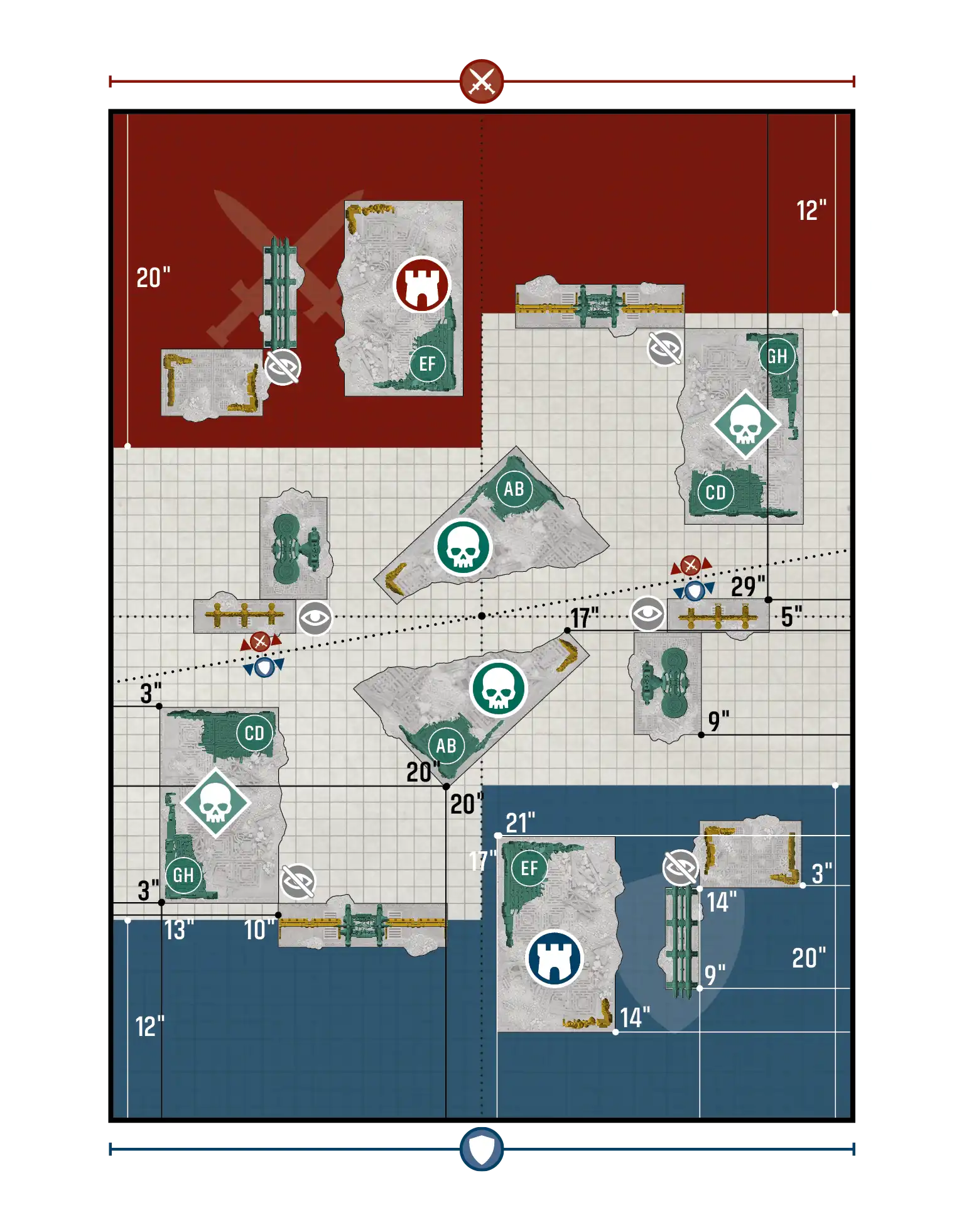
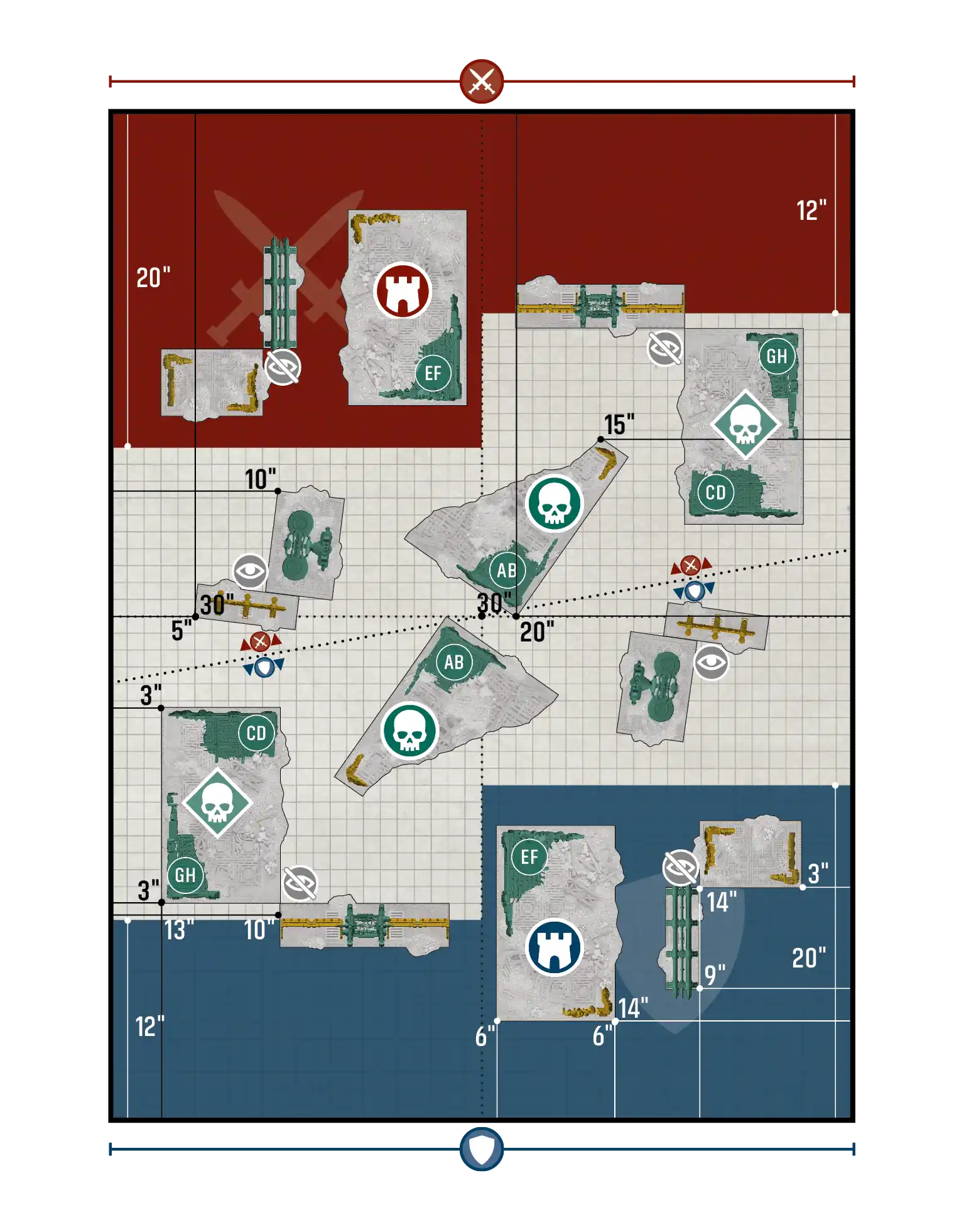
changedDisruption / Reconnaissance - Layout A
changedDisruption / Reconnaissance - Layout B
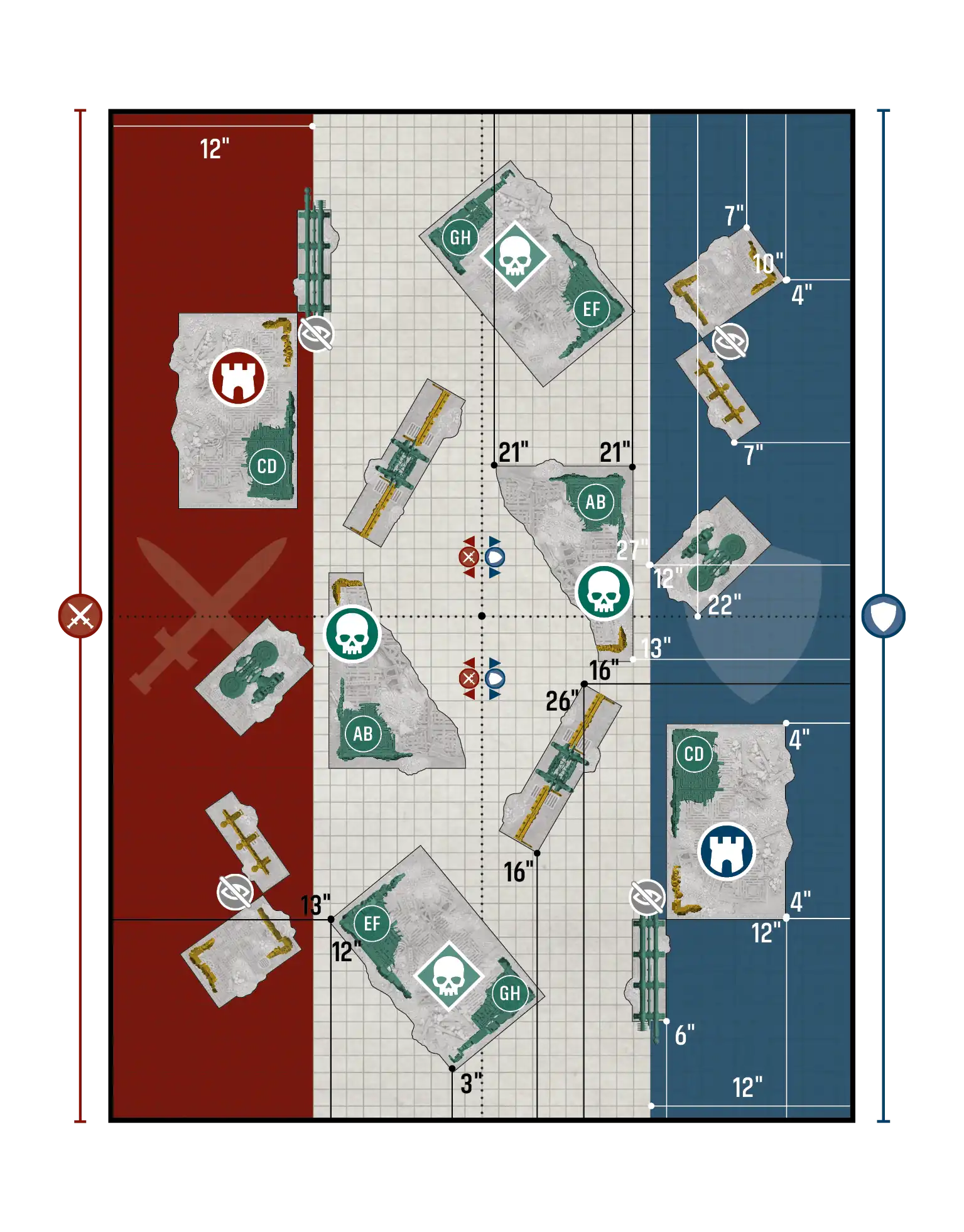
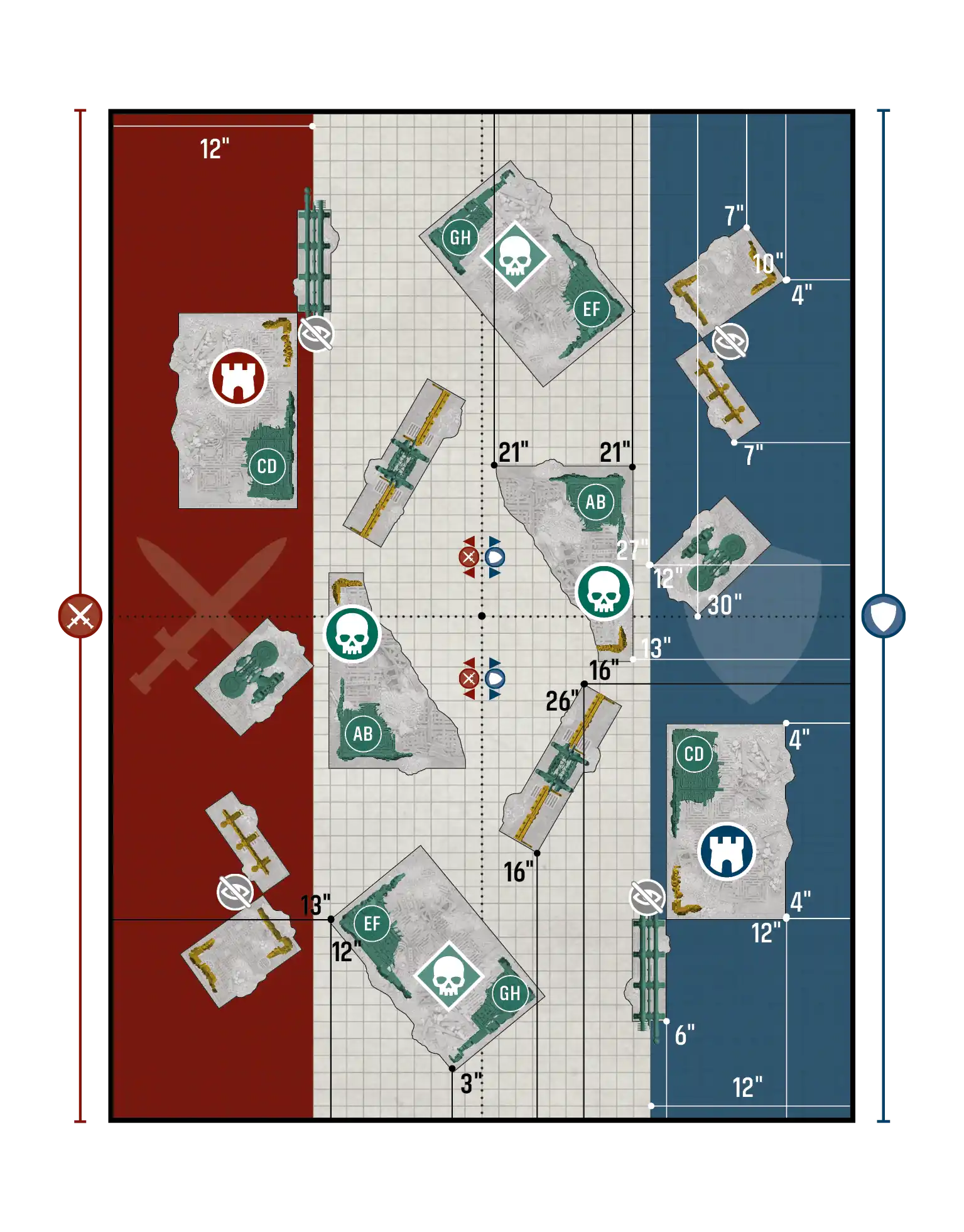
changedDisruption / Reconnaissance - Layout C
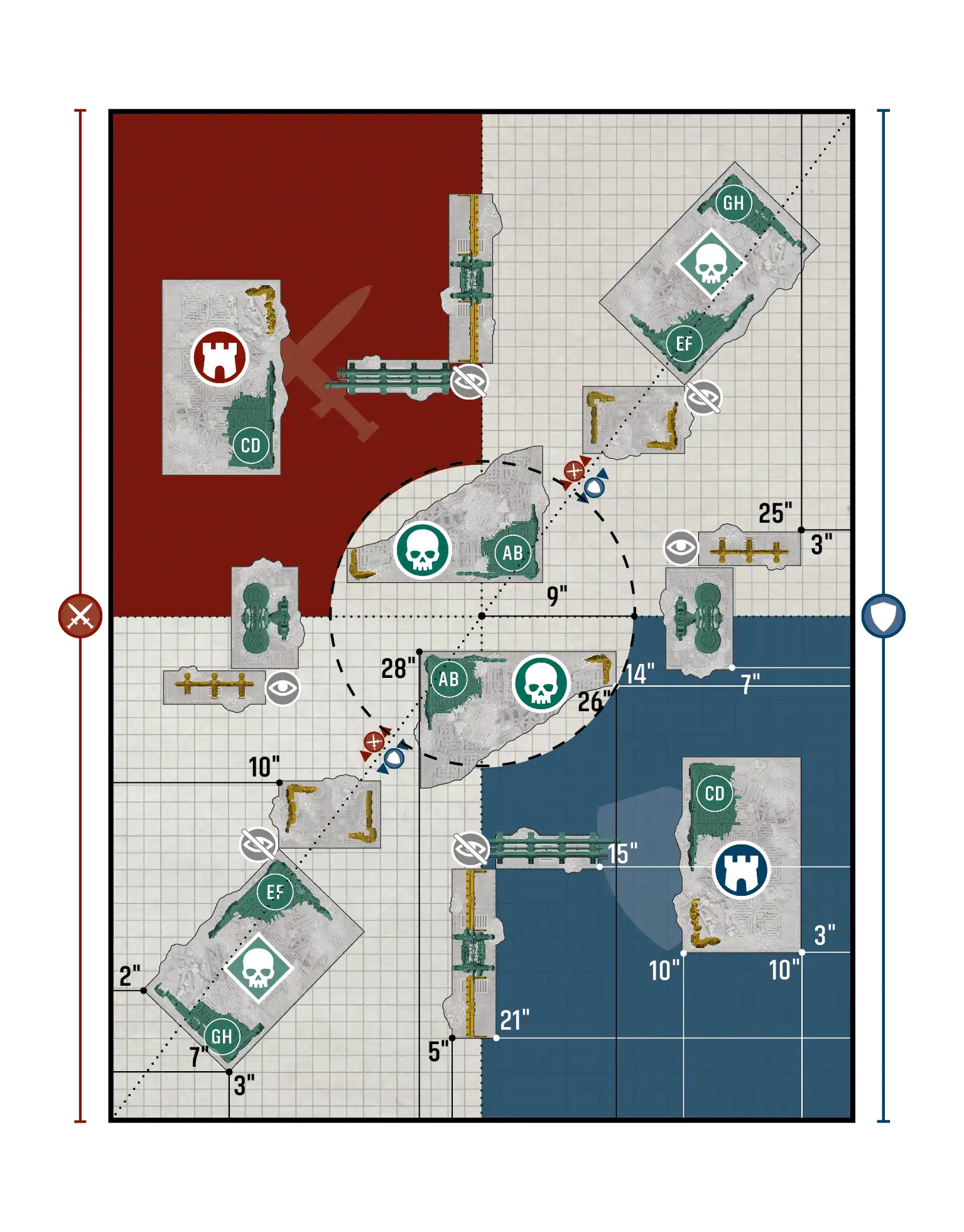
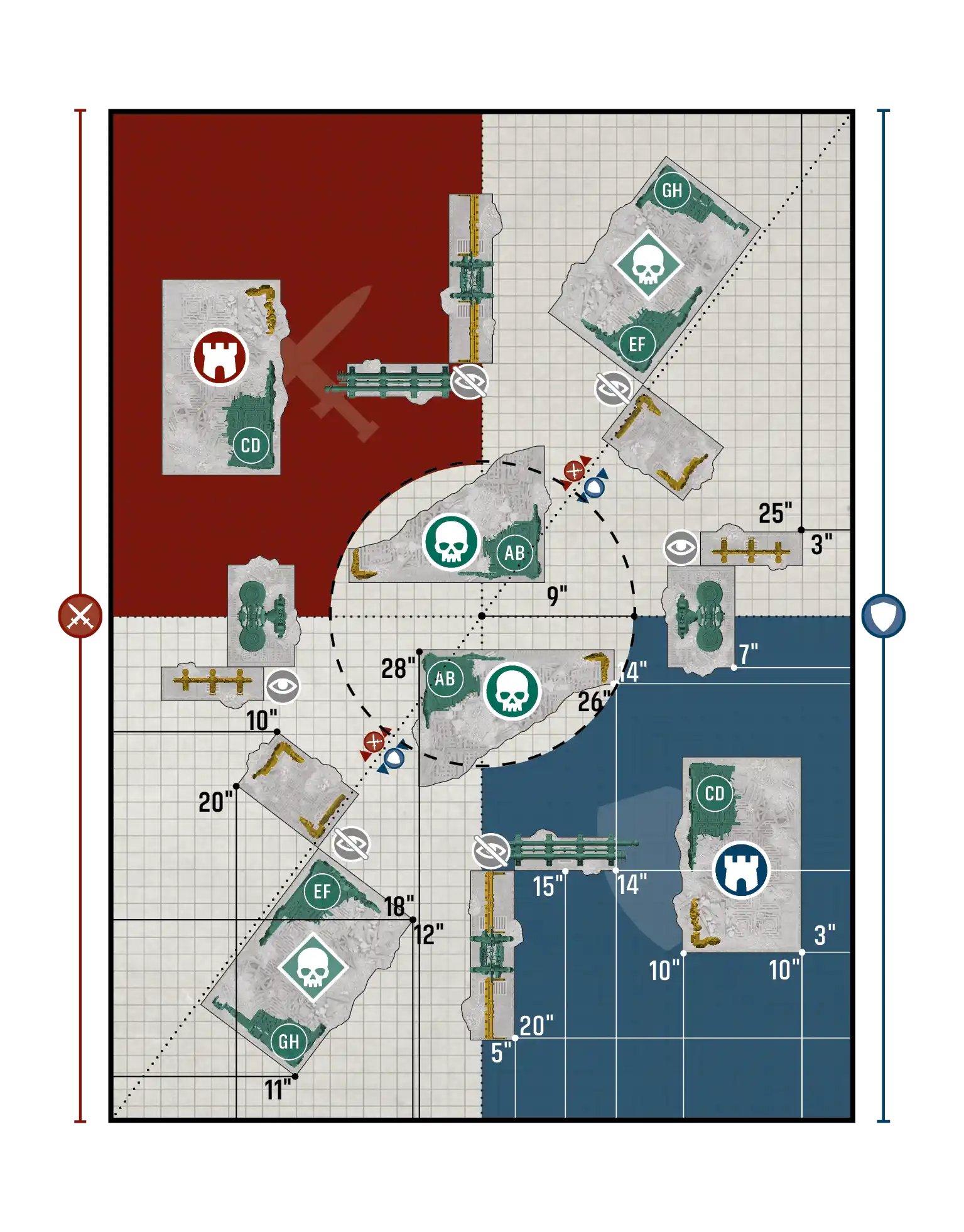
changedPurge the Foe / Disruption - Layout A
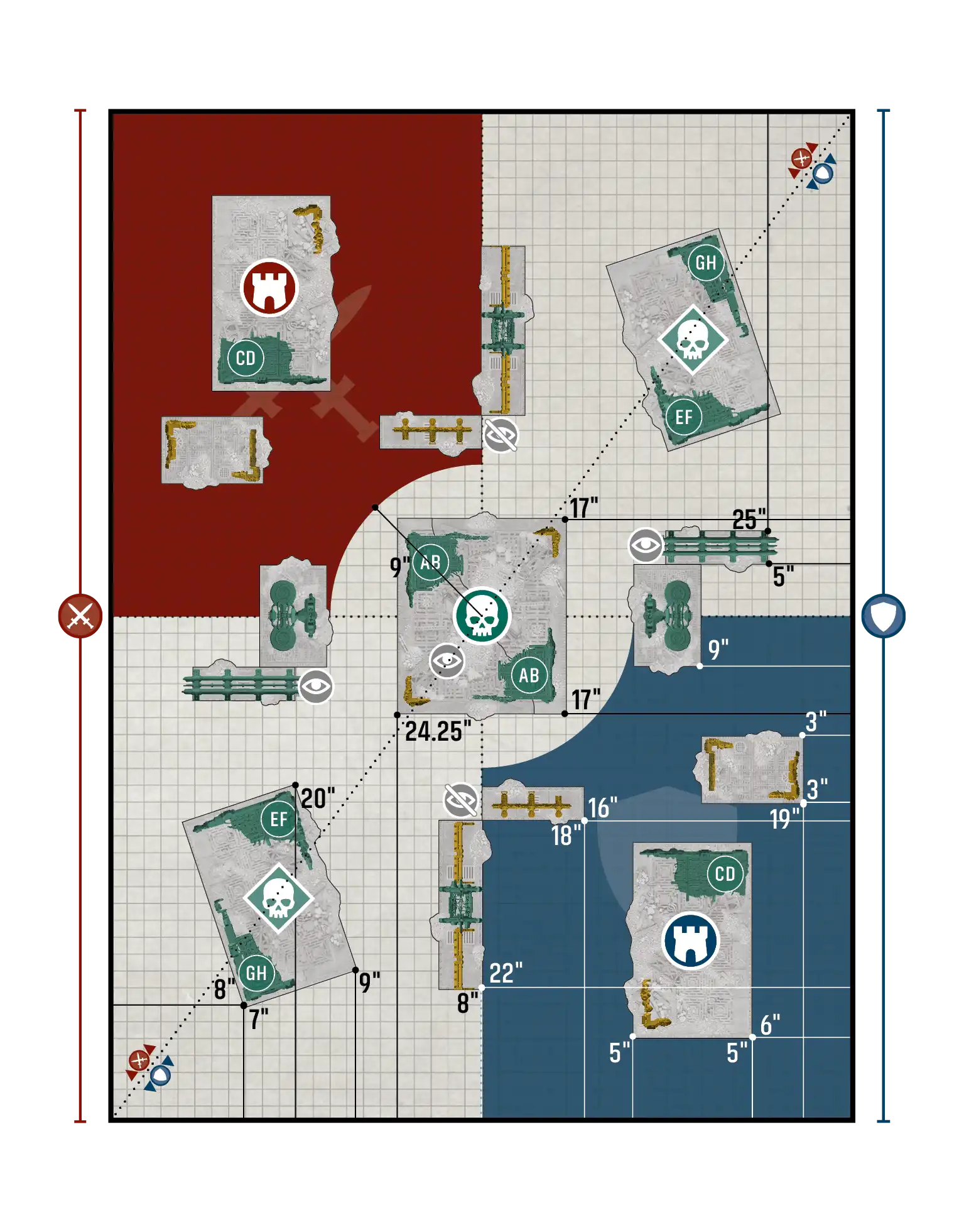
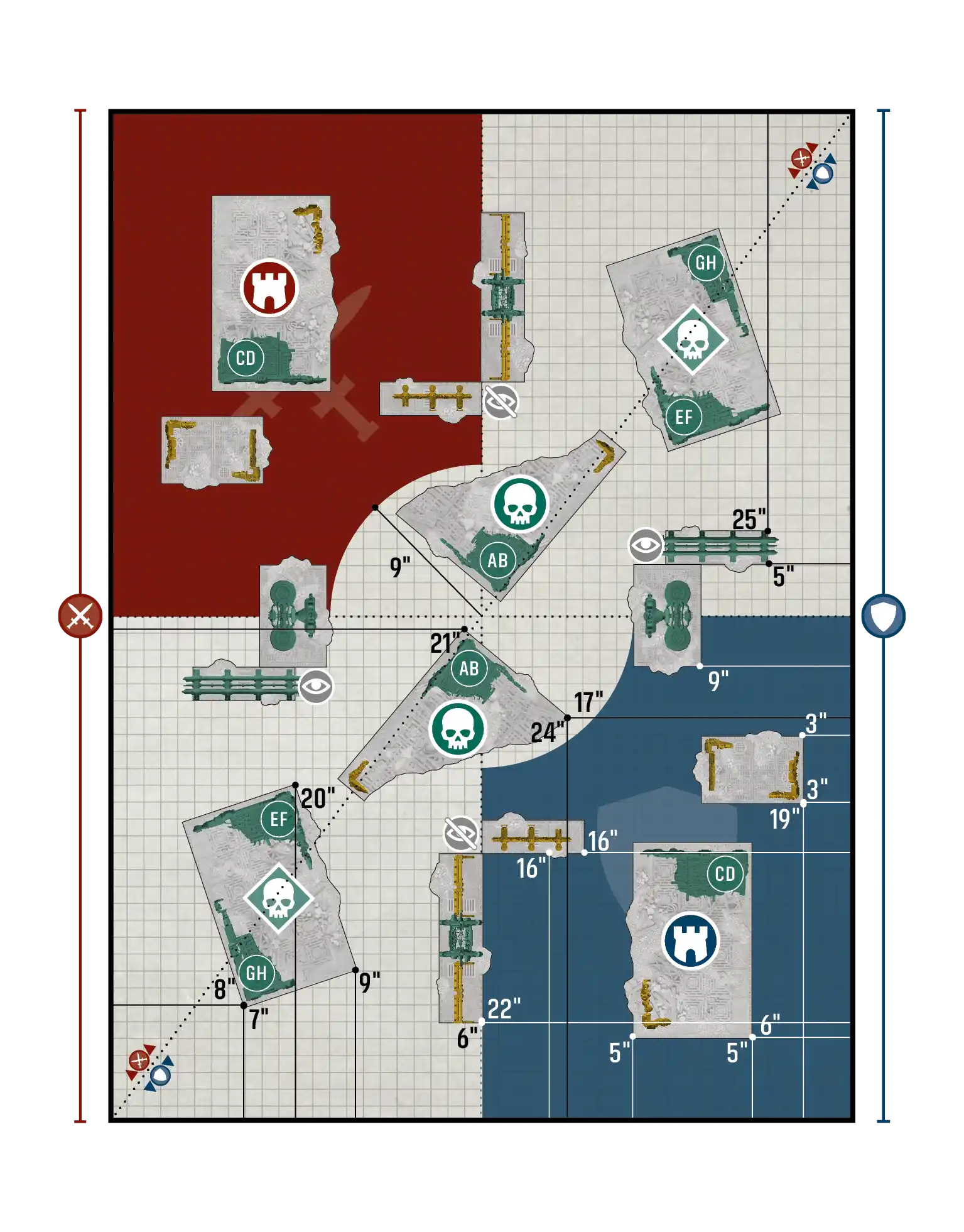
changedPurge the Foe / Disruption - Layout B
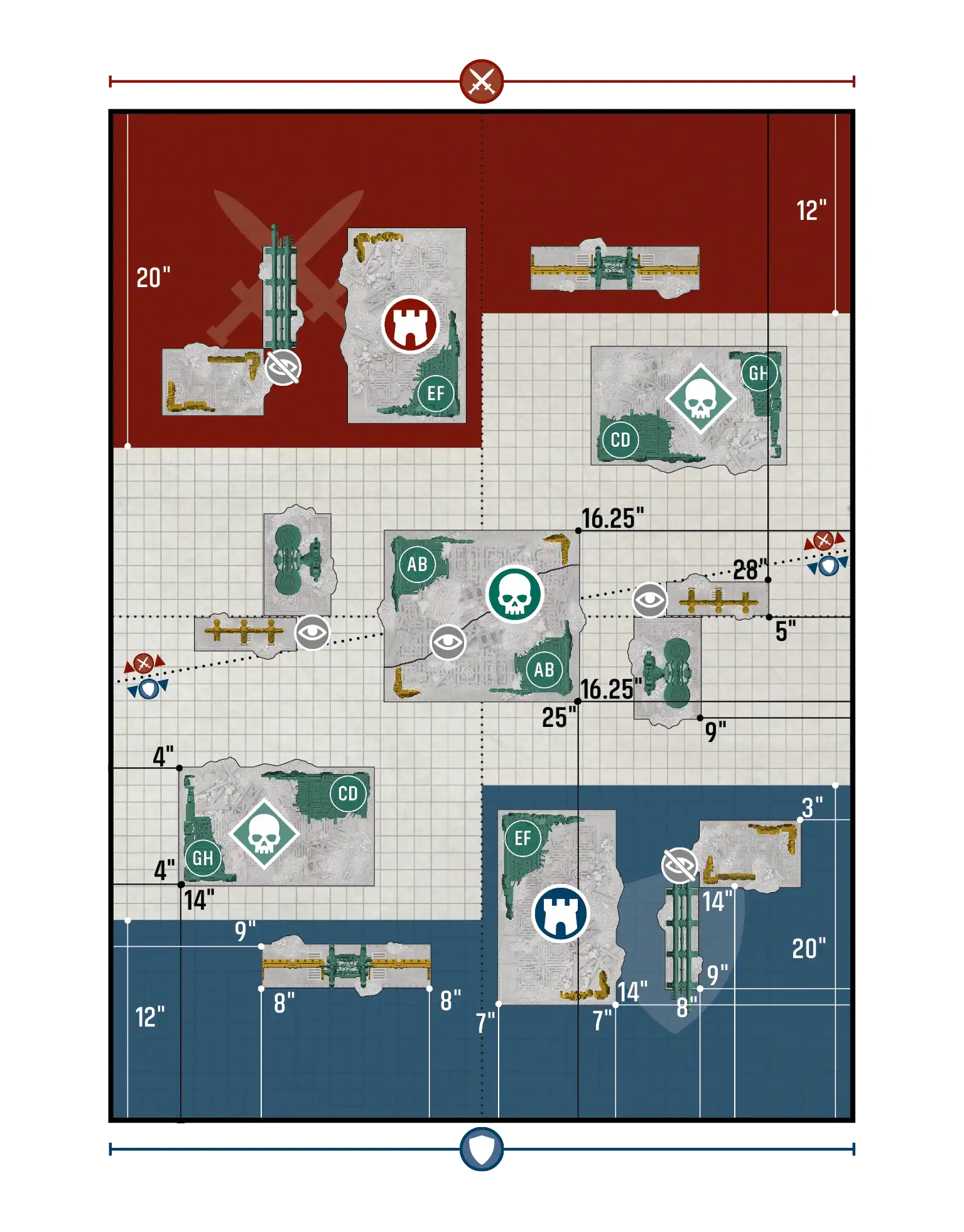
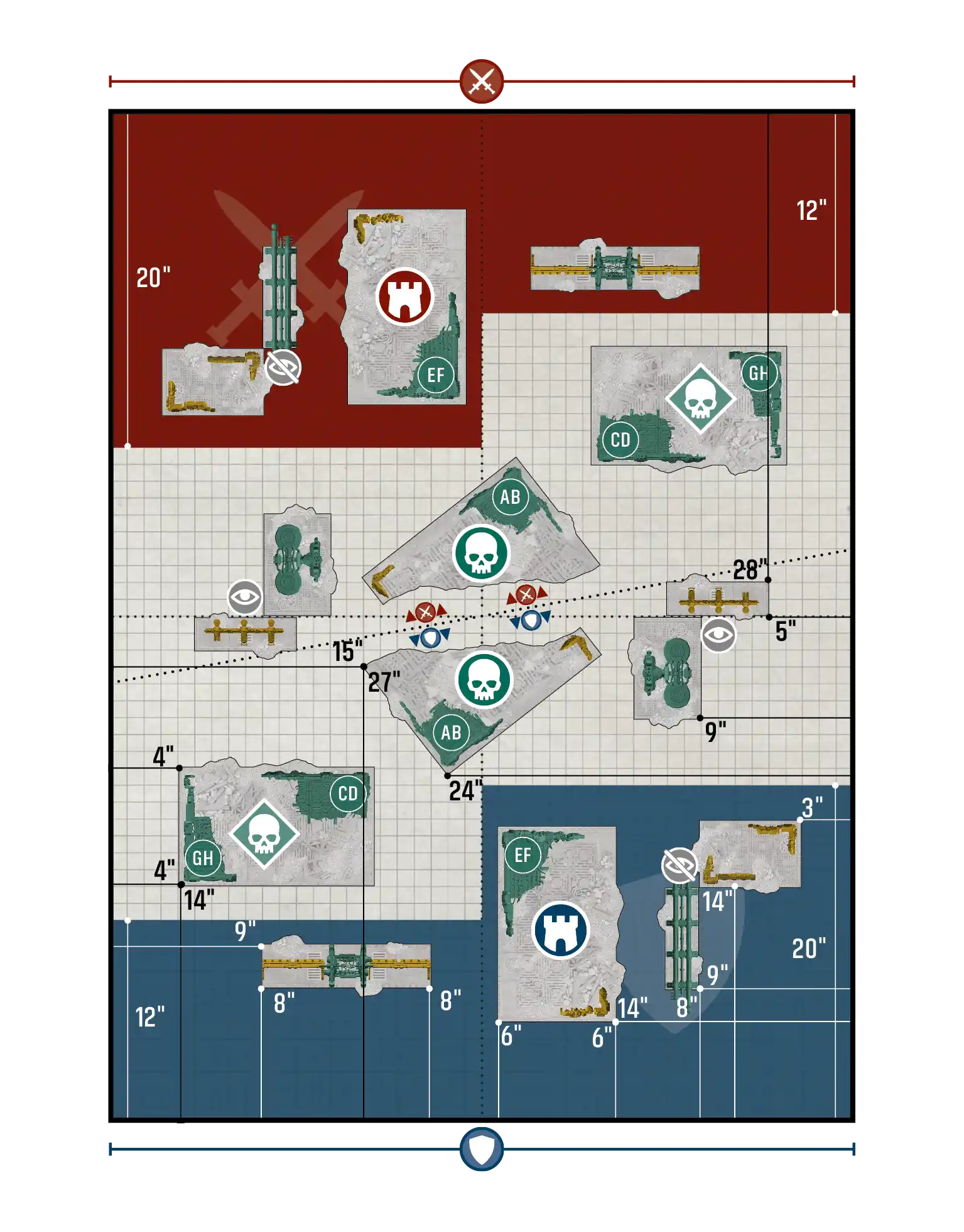
changedPurge the Foe / Disruption - Layout C
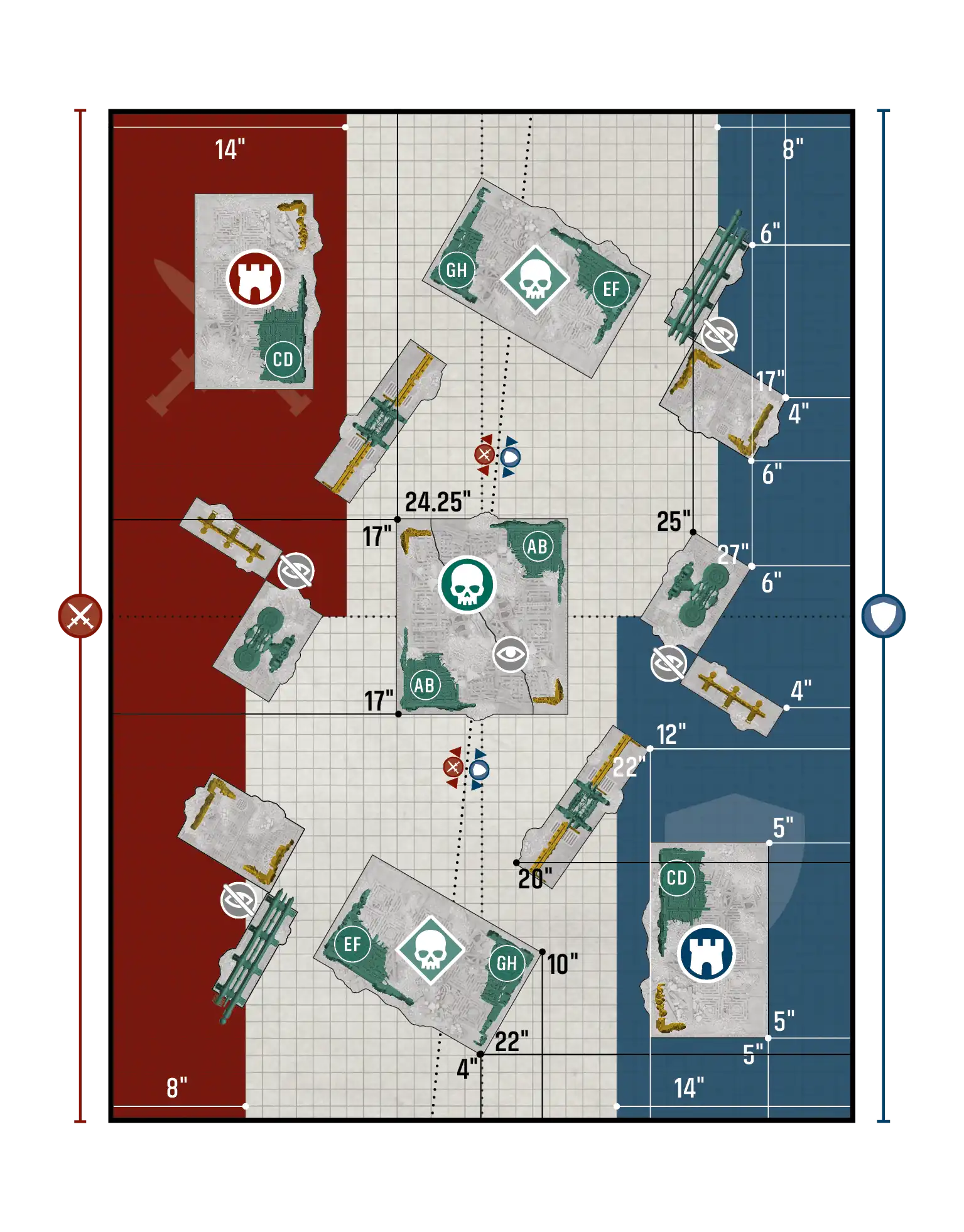
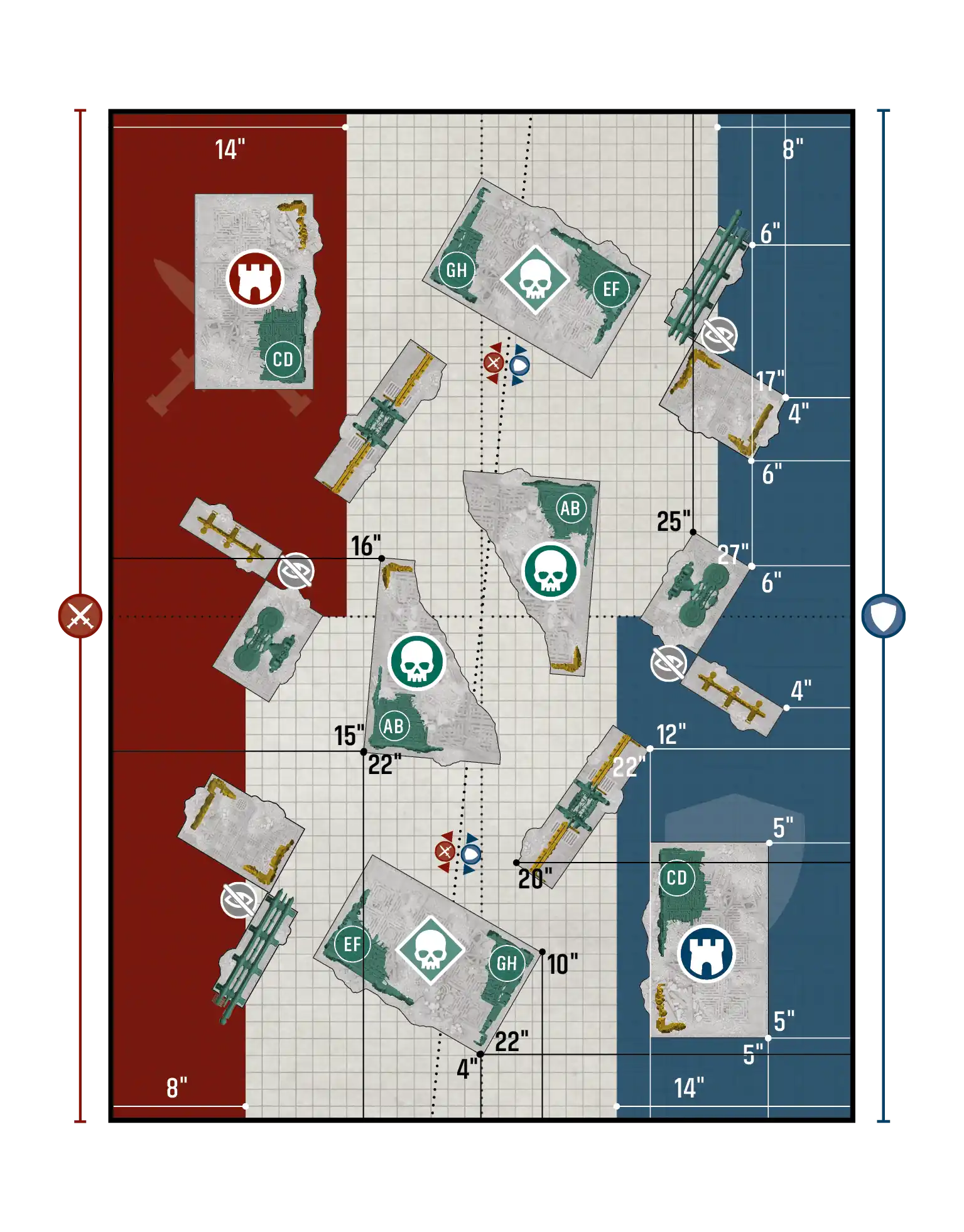
changedTake and Hold / Purge the Foe - Layout A
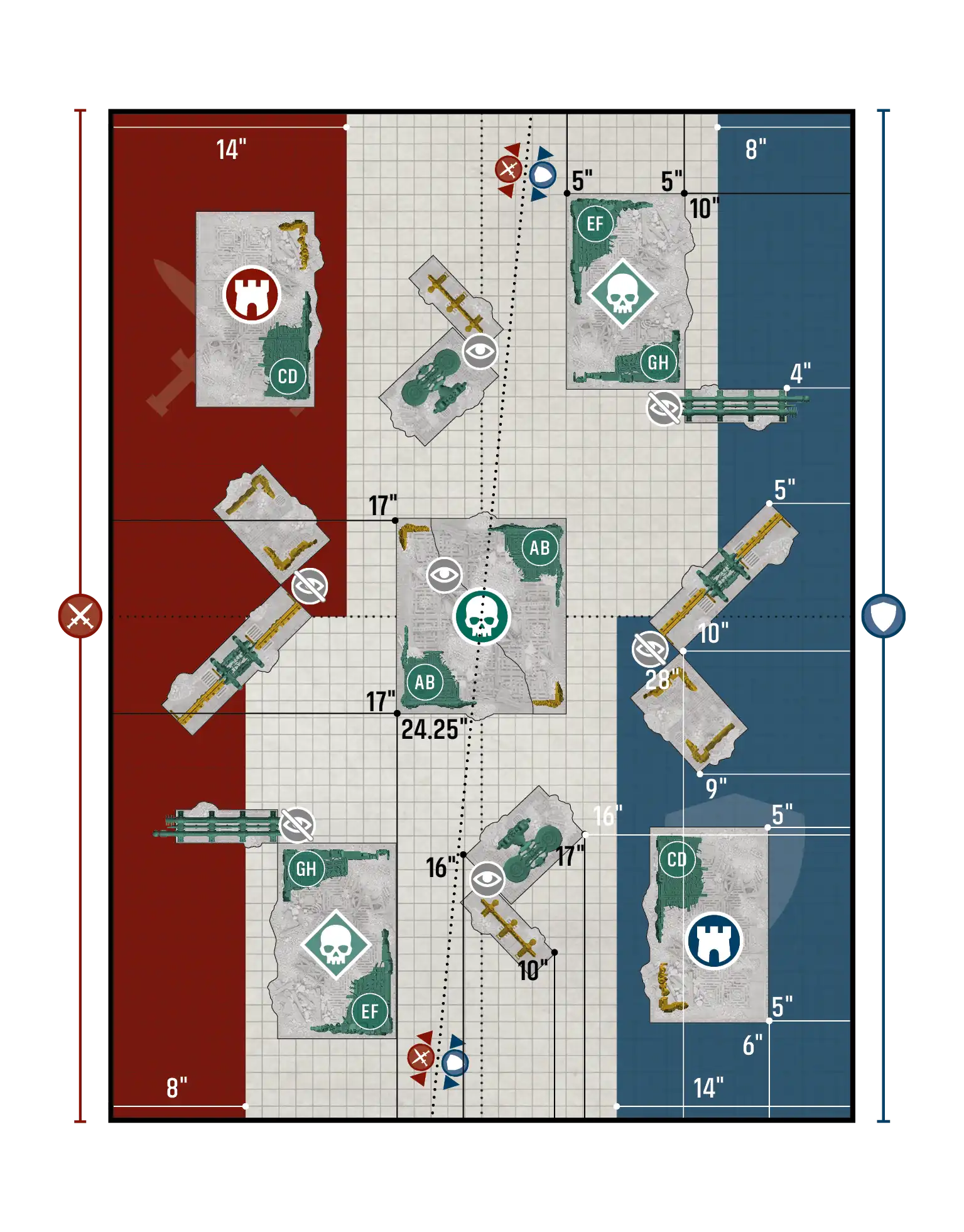
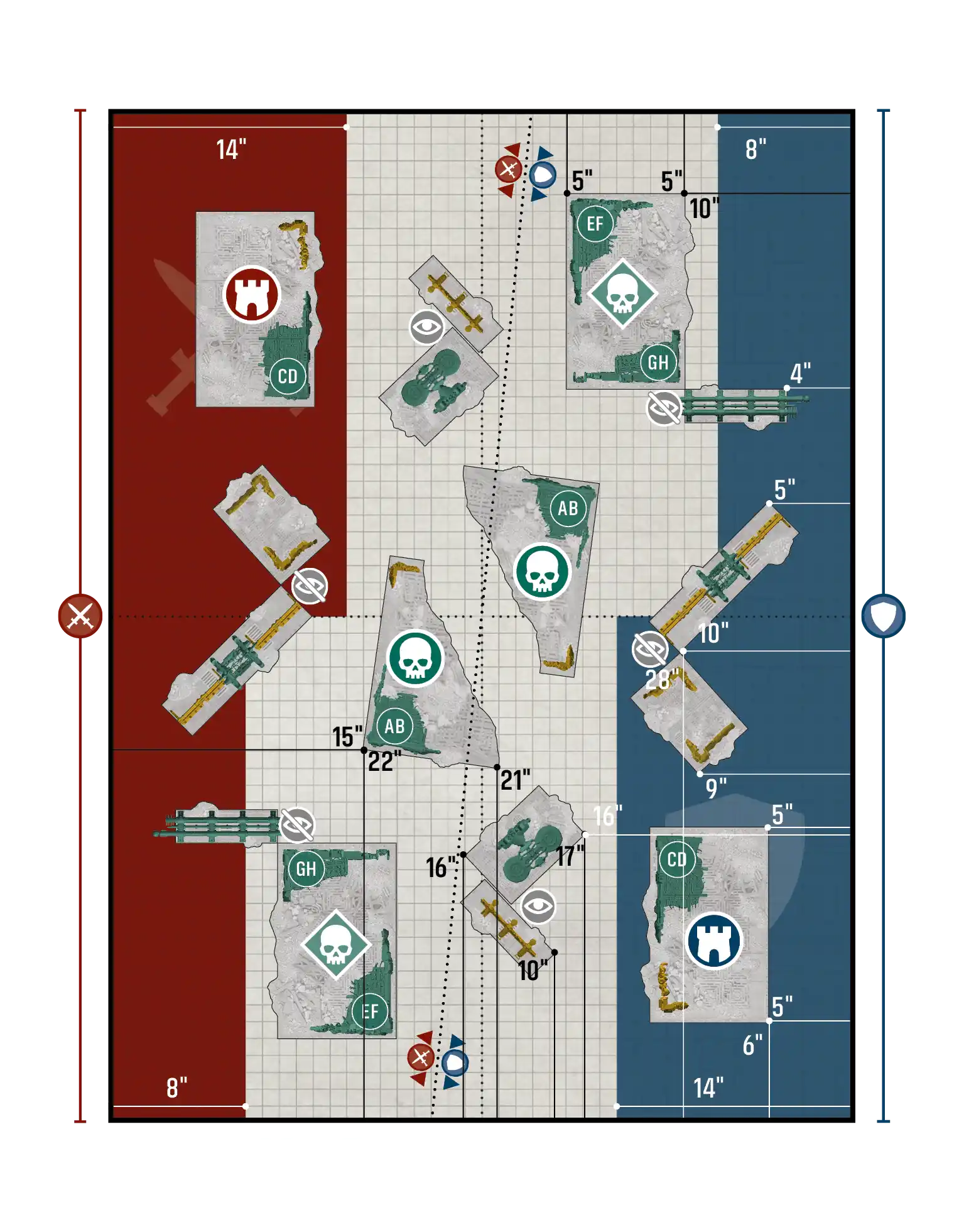
changedTake and Hold / Purge the Foe - Layout B
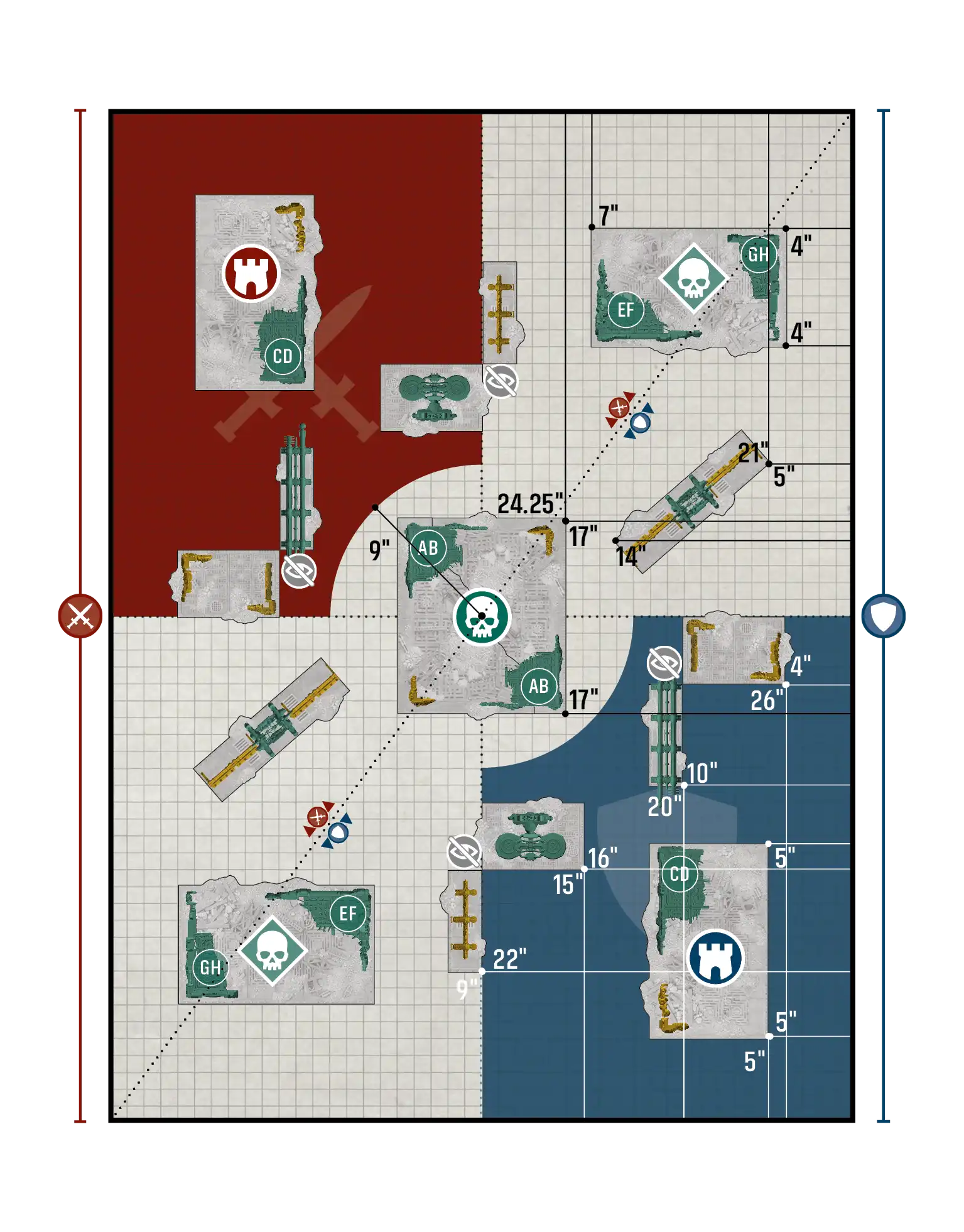
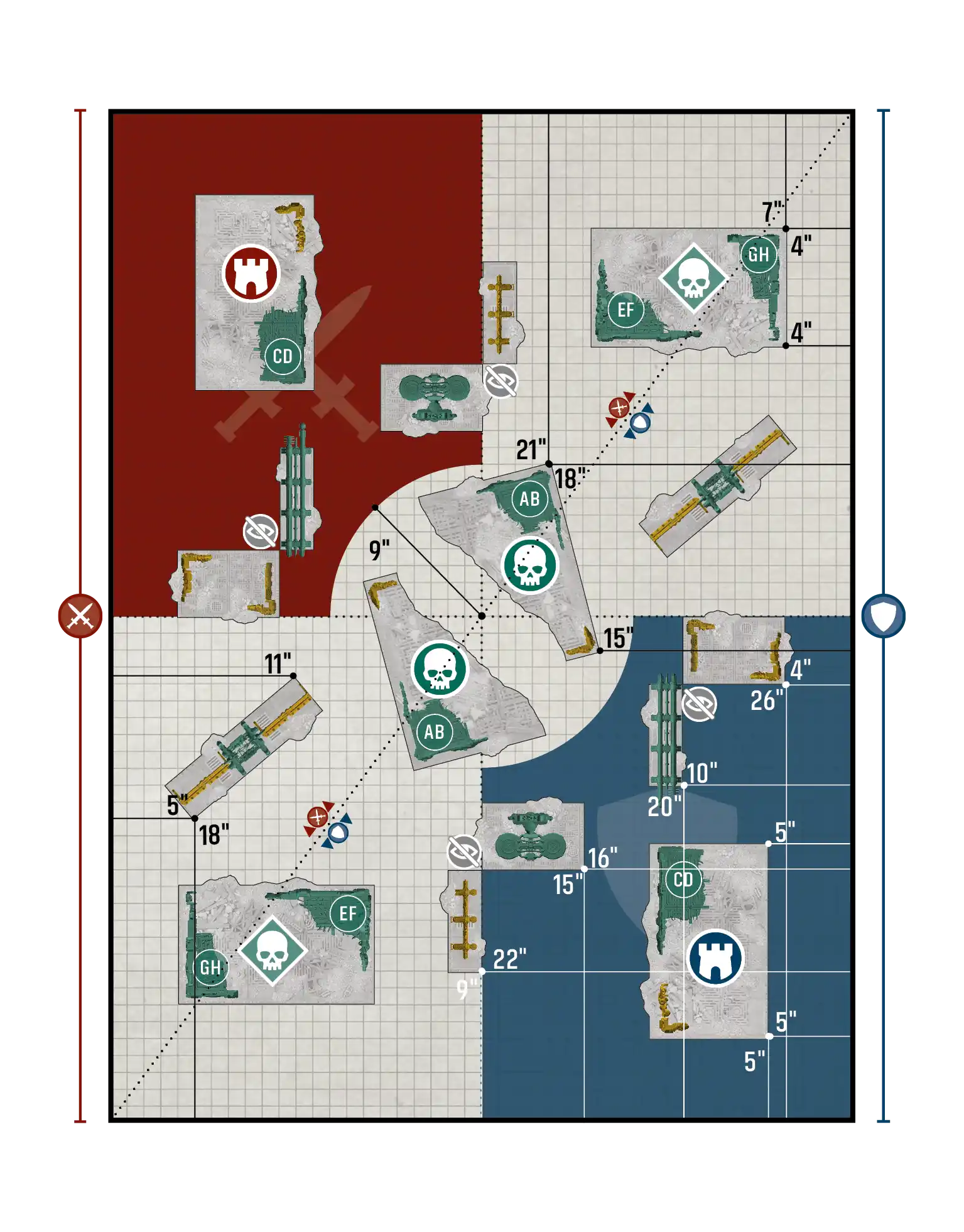
changedTake and Hold / Purge the Foe - Layout C
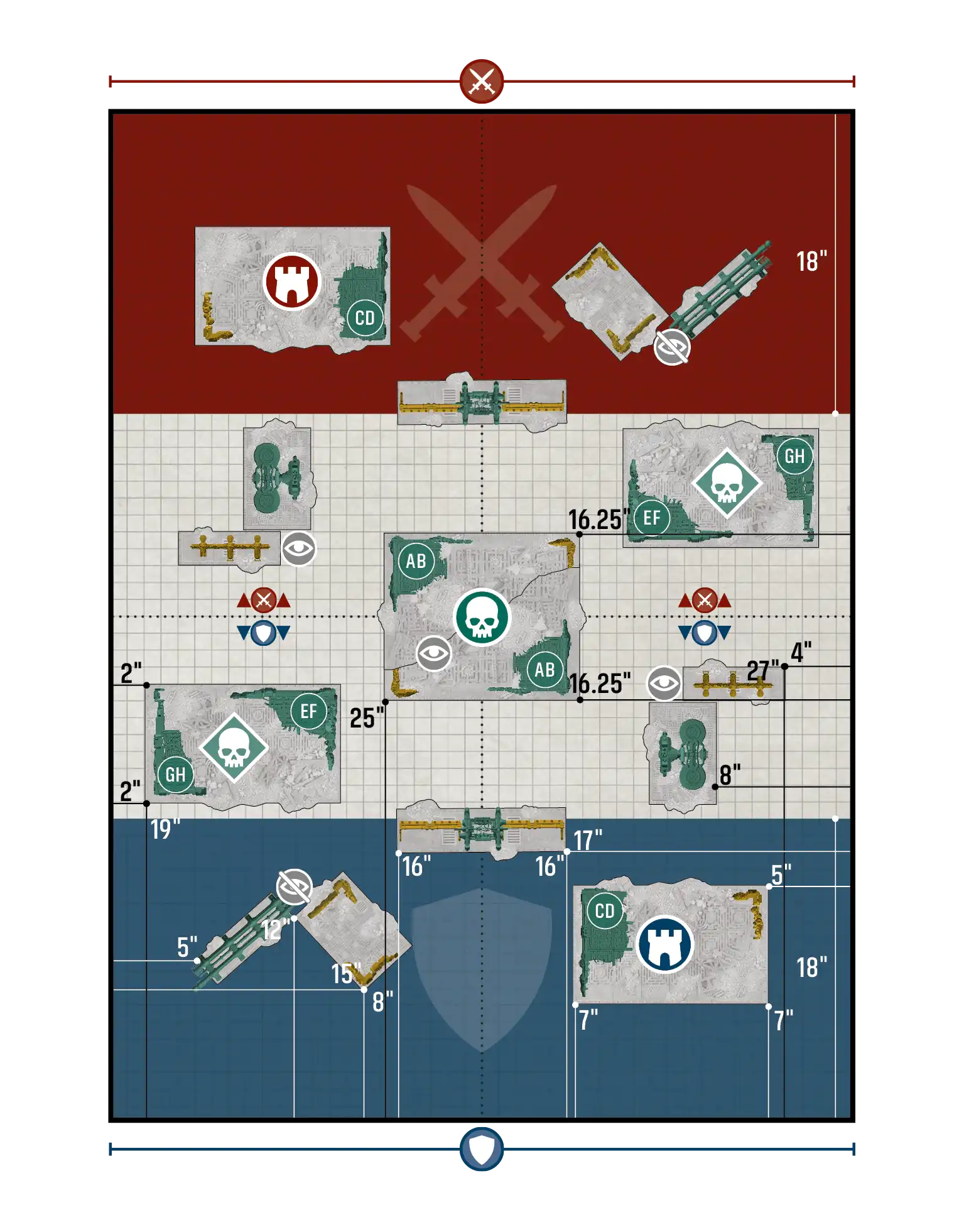
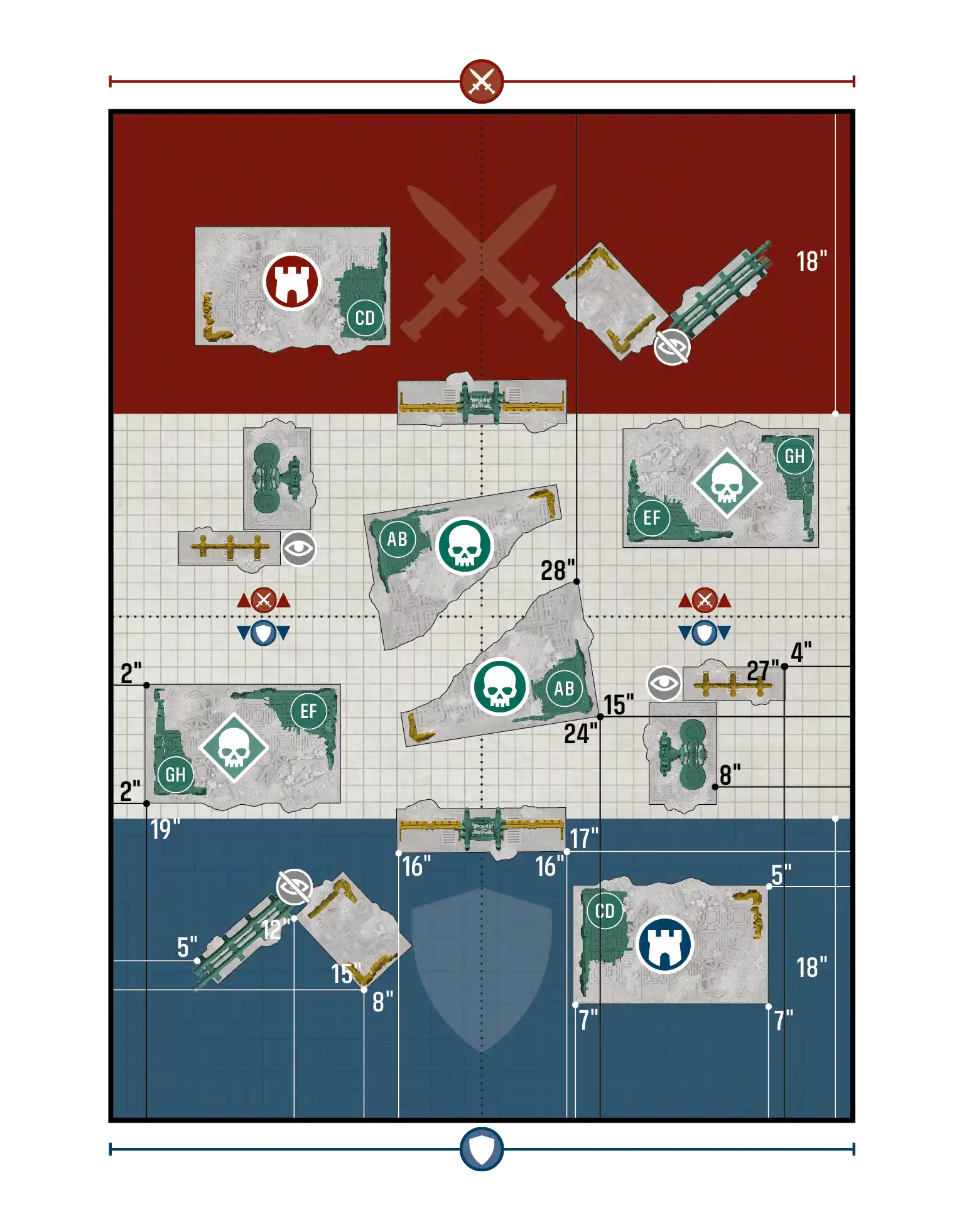
Event CompanionTeams Event Companion
newGENERATING COMMAND POINTS
Excluding Core CP, each player can gain a maximum of 1CP per battle round (including he CP gained when a player discards an active Secondary Mission card).
changed4. DETERMINE ATTACKER AND DEFENDER
Players look at the selected layout and agree which edges of the battlefield the players have set up correspond with the Attacker’s and Defender’s battlefield edges labelled on the card. Who is the Attacker and who is the Defender matches the pairings system. For refused Attackers or Champions playing each other, rollRoll off: the winner decides who will be the Attacker and who will be the Defender for steps 5-8.Defender.
FAQ
QAre models that are within the boundary of a terrain area, but not on the ground floor of a terrain area (e.g. overhanging parts of FRAME VEHICLES or models on terrain features that are within that terrain area) within that terrain area?
QAfter using an ability that increases the CP cost of a stratagem, if my opponent does not have the necessary CP available for the selected stratagem, what happens?
No CP are spent and that stratagem's effects are not resolved (but that stratagem still counts as having been used this phase).
QAfter using an ability that increases the CP cost of a stratagem, must my opponent continue to use the selected stratagem at the increased cost if they have the necessary CP available?
Yes.
QIn what step during the attack sequence do I roll for Feel No Pain?
In the Resolve Damage step of the Inflict Damage step (05.04).
QIs being within range of a terrain objective the same as being within range of an objective marker?
Yes.
QWhile making a move type other than a normal/advance move, can my MONSTER/VEHICLE unit move through friendly units?
Yes.
QIf I place units in strategic reserves during the battle, can this exceed the 50% of my points limit for the battle restriction as mentioned in Placing Units in Strategic Reserves (20.01)?
Yes. That restriction is applicable before the battle, in the Declare Battle Formations step.
QCan I group or allocate a wound to a destroyed model?
QDoes vertical movement in a unit that has taken to the skies count towards the distance a model has used for the purposes of [Heavy]?
QDo rules that affect a keyword include multi-word keywords that contain that keyword? For example, would rules that affect Commissar units affect a unit that has the Commissar Graves keyword?
QAre Upgrades enhancements?
Yes, Upgrades are a type of enhancement (but not all enhancements are Upgrades).
QCan a unit have both an Upgrade and an enhancement?
No, units are prevented from having two enhancements, and Upgrades are enhancements.
QCan an Epic Hero unit form an attached unit with a unit that has an enhancement?
Yes.
QCan an attached unit be given an Upgrade?
Yes.
QIf a stratagem contains a section that carries an additional CP cost (such as the Into the Fray option of Heroic Intervention), is that additional cost considered to be a modifier?
No, a stratagem that costs 1CP and is making use of an optional +1CP section has an original cost of 2CP.
QDoes the limit to the combined points value of my units in strategic reserves only apply until the start of the first battle round?
Yes.
QWhen my unit shoots at another unit, how does it work if some models in the target unit are fully visible to some models in my unit, while others are within a terrain area/not fully visible?
For each attacking model in your unit, determine whether the target unit has the benefit of cover, as described in Terrain and Visibility. In this scenario, the target unit will likely have the benefit of cover against some of the attacking models, but not all.
This means that, in an example unit where all attacking models are using the same weapon, when you get to the Resolve Attacks step of the Attack Sequence, you will collect dice for attacks made by models against which the target unit has the benefit of cover separately from the dice for attacks made by models against which the target unit does not have the benefit of cover.
ErrataRad-Zone Corps Detachment
Rad-bombardment Detachment Rule, Battle Round 1 Section, Unit Taking Cover Section
Change to:
‘• That unit is battle-shocked.
• On a 5+, that unit suffers D3 mortal wounds.'
ErrataSkitarii Hunter Cohort Detachment
Stealth Optimisation Detachment Rule
Change to:
'Friendly SKITARII INFANTRY, SKITARII MOUNTED and IRONSTRIDER BALLISTARII units have Stealth.'
ErrataDatasheets
Belisarius Cawl, Corpuscarii Electro-Priests, Cybernetica Datasmith, Fulgurite Electro-Priests, Kastelan Robots, Tech-Priest Dominus, Tech-Priest Enginseer, Tech-Priest Manipulus, Technoarcheologist
Faction Abilities section
Add 'Doctrina Imperatives'.
ErrataBelisarius Cawl
■ Keywords section: Add 'MOBILE'
■ Move characteristic: change to 8".
■ Canticles of the Omnissiah Ability
Change to:
‘At the start of your Command phase, select one of the abilities in the Canticles of the Omnissiah section. Until the start of your next Command phase, this model has that ability.’
■ Invocation of Machine Vengeance Ability
Change to:
‘At the start of your Command phase, select one unit from your opponent’s army. Until the start of your next Command phase, that enemy unit is your Machine Vengeance target. Each time a model in a friendly ADEPTUS MECHANICUS unit makes an attack that targets your Machine Vengeance target, you can re-roll the Hit roll.’
■ Mantra of Discipline Ability
Change to:
‘This model has the BATTLELINE keyword and has the following ability: Binharic Courage (Aura): While a friendly ADEPTUS MECHANICUS unit is within 6" of this model, add 1 to the Objective Control characteristic of models in that unit and each time you take a Battle-shock or Leadership test for that unit, add 1 to that test.’
■ Shroudpsalm (Aura) Ability
Change to:
‘While a friendly ADEPTUS MECHANICUS unit is within 6" of this model, that unit has the Stealth ability.’
■ Solar atomiser weapon: Change A to '3' and D to 'D6'.
ErrataCybernetica Datasmith
Add new ability:
‘Data-severed: If there are no KASTELAN ROBOT models in this unit:
▪ This unit loses VEHICLE.
▪ This unit has INFANTRY.'
ErrataKastelan Robots, Repulsor Grid ability
Change to:
‘When an enemy unit targets this unit with ranged attacks, until that enemy unit has shot, when this unit makes a save roll:
▪ On an unmodified 6, that enemy unit suffers 1 mortal wound after that enemy unit has shot.'
ErrataAX 1-0 Tiger Shark, Manta, Ta'unar Supremacy Armour, Tiger Shark, Keywords section
Add 'FRAME'.
ErrataOath of Moment, Army Rules
Change to:
‘If your Army Faction is ADEPTUS ASTARTES, at the start of your Command phase, select one unit from your opponent’s army. Until the start of your next Command phase, that enemy unit is your Oath of Moment target. Each time a model with this ability makes an attack that targets your Oath of Moment target:
■ You can re-roll the Hit roll.
■ If you are using a *Codex: Space Marines* Detachment and your army does not include one or more units with the BLOOD ANGELS, DARK ANGELS, DEATHWATCH or SPACE WOLVES keywords, or one or more units from those factions’ Munitorum Field Manual sections, add 1 to the Wound roll as well.’
ErrataChief Librarian Tigurius, Master of Prescience Ability
Change to:'While this model is leading a▪ unit,This eachunit timehas anStealth.
▪ attackMelee targetsattacks that unit, subtracttarget 1this fromunit thehave Hit‐1 roll.to Inhit addition,rolls.
▪ once(Once per battle round, whenper army) When you target thatthis unit with the Counteroffensive/FireCounteroffensive/Fire Overwatch/HeroicOverwatch/Heroic InterventionIntervention stratagem,stratagem, that use is -1‐1 CP.'CP.
ErrataCompany Heroes, KeywordsHeroes
▪ Company Heroes Rule: Remove this rule.
▪ Keywords: Change to:
‘KEYWORDS – ALL MODELS: INFANTRY, GRENADES, IMPERIUM, TACTICUS, COMPANY HEROES | ANCIENT: ANCIENT’
ErrataDrop Pod, Gladiator Lancer, Gladiator Reaper, Gladiator Valiant, Hammerfall Bunker, Impulsor, Invader ATV, Land Raider, Land Raider Crusader, Land Raider Redeemer, Predator Annihilator, Predator Destructor, Razorback, Repulsor, Repulsor Executioner, Rhino, Storm Speeder Hailstrike, Storm Speeder Hammerstrike, Storm Speeder Thunderstrike, Stormhawk Interceptor, Stormraven Gunship, Stormtalon Gunship, Vindicator, Whirlwind – Keywords Section
Add 'FRAME'.
ErrataIntercessor Squad, Abilities Section
Add new ability:‘TargetReplace Elimination:previously Eachadded timeTarget thisElimination unitability iswith selectedthe tofollowing shoot,new itability:
‘Hail canof useBolts: thisIn ability.your IfShooting itphase, does,when untilthis theunit endis ofselected theto phase,shoot, addselect 2up to the Attacks characteristicone ofvisible boltenemy riflesunit. equippedWhile bymaking modelsthose inattacks, this unitunit’s andBolt youRifle canattacks onlythat selecttargeted onethat enemy unit as the target of all of thishave unit’s+2 attacks.’A.'
ErrataRoboute Guilliman
■ Keywords – Add ‘MOBILE'
■ Author of the Codex Ability – Change to:
‘At the Start of your Command phase, select two Author of the Codex abilities (see left). Until the start of your next Command phase, this model has those abilities.’
■ Supreme Strategist Ability – Change to:
‘Once per battle round, one model from your army with this ability can use it when a friendly ADEPTUS ASTARTES unit within 12" of that model is targeted with a Stratagem. If it does, reduce the CP cost of that use of that Stratagem by 1CP.’
ErrataStormlance Task Force Detachment, Shock Assault Stratagem
Change to:
‘WHEN: Fight phase, when a friendly ADEPTUS ASTARTES unit is selected to fight.
TARGET: That ADEPTUS ASTARTES unit.
EFFECT: Your unit’s melee attacks have [LANCE].'
ErrataStormlance Task Force Detachment, Ride Hard, Ride Fast Stratagem, Effect Section
 Change to:
‘Until the end of the phase, each time an attack targets your unit, subtract 1 from the Wound roll.'
ErrataCaptain, Leader Section
Remove the following:
‘This model cannot be attached to a BLADEGUARD VETERAN SQUAD unless this model is equipped with a relic shield, and cannot be attached to a HELLBLASTER SQUAD unless this model is equipped with a plasma pistol.'
ErrataChaplain with Jump Pack
Ranged Weapons:
Add the following profile:
Absolvor Bolt Pistol RANGE 18" A1 BS3+ S5 AP-1 D2 [CLOSE-QUARTERS]
Wargear Options Section: Add the following bullet: '• 1 Absolvor Bolt Pistol
ErrataVanguard Veteran Squad with Jump Packs
▪Ranged Weapons: Add the following profile:
Heavy Bolt Pistol RANGE 18" A1 BS3+ S4 AP-1 D1 [CLOSE-QUARTERS]
▪ Melee Weapons: Add the following profile:
Master‑crafted Power Weapon RANGE Melee A3 WS3+ S5 AP-2 D2
▪ Wargear Options: Add the following:
▫ All models can each have their Bolt Pistol and Vanguard Veteran Weapon replaced with:
▫ 1 Heavy Bolt Pistol and 1 Master-crafted Power Weapon
▫ For every 5 models in this unit, 1 model can replace their Heavy Bolt Pistol with 1 Plasma Pistol.’
ErrataArmy Rules, Reanimation Protocols Army Rule
Change to:
‘If your Army Faction is NECRONS, at the end of your Command phase, each friendly unit with this ability that is on the battlefield activates its Reanimation Protocols:
▪ When a unit’s Reanimation Protocols activate, that unit heals D3 wounds.'
ErrataChronomancer, Geomancer, Orikan The Diviner, Plasmancer, Psychomancer, Technomancer – Core Abilities Section
Remove▪Core Abilities: 'Leader', add 'Support'.
▪Leader Section: Remove ‘You can attach this model to one of the above units even if one ROYAL WARDEN or NOBLE unit has already been attached to it. If you do, and that Bodyguard unit is destroyed, the Leader units attached to it become separate units, with their orginial Starting Strengths.'
ErrataAnnihilation Barge, Catacomb Command Barge, Convergence of Dominion, Doomsday Ark, Ghost Ark, Monolith, NightObelisk, Scythe,Seraptek Obelisk,Heavy Construct, Tesseract Vault, Triarch Stalker and Seraptek Heavy Construct – Keywords Section
Add 'FRAME'.
ErrataInsanity’s Ire Stratagem
Change to:
‘WHEN: Your opponent’s Shooting phase, when an enemy unit that targeted a friendly unengaged DESTROYER CULT/FLAYED ONES unit this phase has shot.
TARGET: That DESTROYER CULT/FLAYED ONES unit.
EFFECT: Your unit can make a surge move of up to D6".'
ErrataAwakened Dynasty Detachment, Veil of Darkness Enhancement
Change to:
‘(Once per battle, per army) At the end of your opponent’s turn, if this unit is unengaged, you can use this ability. If you do:
▪ Place this unit in strategic reserves.
▪ This unit has Deep Strike until the start of your next Shooting phase.
▪ This unit must make an ingress move in your next Movement phase (including in your first turn).'
ErrataAwakened Dynasty Detachment, Protocol of the Eternal Revenant Stratagem, Effect Section 
Change to:
‘At the end of the phase, set up the destroyed model on the battlefield, unengaged and as close as possible to where it was destroyed. That model is not part of an attached unit and its unit has a starting strength of 1. That model has half of its starting number of wounds remaining.'
ErrataLokhust Lord, Overlord, Overlord with Translocation Shroud – Resurrection Orb Ability
Change to:
‘(Once per battle, per unit) At the end of any phase, you can use this ability. If you do, this unit resurrects:
▪ When a unit resurrects, that unit’s Reanimation Protocols activate, but that unit heals D6 wounds (instead of D3 wounds). You cannot resurrect more than one unit per turn.'
ErrataCanoptek Reanimator, Nanoscarab Reanimation Beam Ability
Change to: ‘While a friendly NECRONS unit is within 3" of this model, each time that unit’s Reanimation Protocols activate, that unit heals an additional D3 wounds.'
ErrataChronomancer, Timesplinter Mantle Ability
Change to:
▪ This unit has Stealth.
▪ Melee attacks that target this unit have -1 to hit rolls.
ErrataNight Scythe
▪ Core Abilities: Add ‘Deep Strike'.
ErrataTranscendent C'tan, Transdimensional Displacement Ability
Change to:
‘In your Movement phase, when this unit is selected to make an advance move, you can use this ability. If you do:
▪ That advance move has no maximum distance.
▪ This unit can move through all types of model (including enemy models and MONSTER/VEHICLE models).
▪ After moving, this unit must be more than 8" horizontally from all enemy units.'
QWhen being set up using the Cosmic Precision Stratagem, does a model that is large (e.g. a Tesseract Vault) have to follow the rules for large models in the Setting Up Large Models Appendix(3.2.1)?Appendix (03.02.02)?
Yes.
ErrataVanguard Onslaught Detachment, Chameleonic Enhancement
Change to:
‘VANGUARD INVADER model only. This unit has Stealth.'
ErrataTyranid Warriors with Melee Bio-weapons, Adaptive Instincts Ability
Change to:
‘Adaptive Instincts (Once per turn, per unit): In the Fight phase, when this unit is selected to fight or when an enemy unit targets this unit, you can select one of the following:
▪ This unit’s melee attacks have +1 S.
▪ Or: This unit has +1 T.'
ErrataTyrannocyte, Aerial Seeding Ability
Change 9" to 8".
ErrataVenomthropes, Foul Spores ability
Change to:
‘Friendly TYRANIDS units within 6' of this unit have Stealth.'
ErrataCompany of Hunters Detachment, Masters of Manoeuvre Detachment Rule
ChangeFriendly to:‘ADEPTUSADEPTUS ASTARTES unitshave:
▪ fromThis yourunit’s armyranged areattacks eligiblehave to[ASSAULT].
▪ shootWhen inthis unit is selected to make a turnfall-back inmove, whichthat theyfall-back Advancedmove ordoes Fellnot Back.prevent this unit from being eligible to shoot.
Friendly ADEPTUS ASTARTES MOUNTED unitshave:
▪ fromThis yourunit’s armyranged areattacks eligiblehave [ASSAULT].
▪ When this unit is selected to shootmake andan advance move, that advance move does not prevent this unit from being eligible to declare a chargecharge.
▪ inWhen this unit is selected to make a turnfall-back inmove, whichthat theyfall-back Advancedmove ordoes Fellnot Back.’prevent this unit from being eligible to shoot and eligible to declare a charge**.’
ErrataDeath on the Wind Stratagem
Change to:
‘WHEN: Your Movement phase, when a friendly ADEPTUS ASTARTES unit ends an advance move.
TARGET: That ADEPTUS ASTARTES unit.
EFFECT: That advance move does not prevent your unit from being eligible to declare a charge.
ErrataTalon Strike Stratagem
Change to:
‘WHEN: Fight phase, when a friendly ADEPTUS ASTARTES unit is selected to fight.
TARGET: That ADEPTUS ASTARTES unit.
EFFECT: Your unit’s melee attacks have [LANCE].'
ErrataShroud of Heroes Enhancement
Change to:
'ADEPTUS ASTARTES model only. (Once per battle, per army) When this model is destroyed, at the end of the phase, roll one D6:
▪ On a 2+, set up this model on the battlefield, unengaged and as close as possible to where it was destroyed. This model is not part of an attached unit and its unit has a starting strength of 1. This model has 3 wounds remaining, or its full wounds remaining if this model was battle-shocked when it was destroyed.'
ErrataLion El’Jonson
▪ Keywords section: Add 'MOBILE'.
▪ All Secrets Revealed Ability – Change to:
‘Mist-wreathed Shadow Realms: InAt the end of your Commandopponent’s phase,turn, if this unit is notunengaged, withinyou Engagementcan Rangeuse ofthis oneability. orIf moreyou enemydo:
▫ units,Place youthis unit in strategic reserves.
▫ This unit can removemake itan fromingress themove battlefieldin andyour placenext itMovement intophase Strategic(including Reserves.'in your first turn).’
■ Martial Exemplar (Aura) Ability – Change to:
‘Martial Exemplar (Aura): While a friendly ADEPTUS ASTARTES unit is within 6" of this model, each time a model in that unit makes a melee attack, re-roll a Hit roll of 1 and re-roll a Wound roll of 1.'
■ Primarch of the First Legion Ability – Change to:
‘Primarch of the First Legion: At the start of your Command phase, select two Primarch of the First Legion abilities. Until the start of your next Command phase, this model has those abilities.’
■ The Emperor’s Shield Ability – Change to: ‘Each time an attack targets this model, if the Strength characteristic of that attack is greater than the Toughness characteristic of this model, subtract 1 from the Wound roll.’
■ Fealty weapon profile: change to:
Fealty - Strike[LETHAL HITS]
Range - Melee
A - 8
WS - 2+
S - 12
AP - -4
D - 4
Fealty - Sweep[SUSTAINED HITS 1]
Range - Melee
A - 16
WS - 2+
S - 6
AP - -3
D - 2
ErrataNephilim Jetfighter, Lightning-fast Manoeuvres Ability
Change to:
‘Ranged attacks that target this unit have ‑1 to wound rolls.'
ErrataRavenwing Command Squad, Keywords Section
Remove ‘Leader’, add ‘Support'.
ErrataRavenwing Darkshroud, Icon of Old Caliban Ability
Change to: ‘Friendly ADEPTUS ASTARTES units within 6" of this unit have Stealth.'
ErrataRavenwing Dark Talon, Stasis Bomb Ability
Change to:
‘Stasis Bomb: At the end of your opponent’s Fight phase, select one visible enemy unit (excluding AIRCRAFT/Lone Operative units) within 24" of this unit. That enemy unit is slowed until the end of your opponent’s next Movement phase:
▪ While a unit is slowed, in your opponent’s Movement phase, when that unit is selected to move, unless that unit remains stationary, roll one D6:
▫ On a 1‑4, that unit suffers D3 mortal wounds and that unit has ‑2" M.
▫ On a 5‑6, that unit suffers 2D3 mortal wounds and that unit has ‑3" M.
ErrataGreen Tide Detachment, Go Get ’Em! Stratagem, Effect Section
Change to:
‘YourWHEN: Your opponent’s Shooting phase, when an enemy unit that targeted a friendly unengaged BOYZ unit this phase has shot.
TARGET: That BOYZ unit.
EFFECT: Your unit can make a surge move of up to D6".'
ErrataBattlewagon, Blitza-bommer, Burna-bommer, Dakkajet, Hunta Rig, Kill Rig, Stompa, Trukk – Keywords Section
Add 'FRAME'.
ErrataBoss Snikrot
■ Red Skulls Kommandos ability: Change to 'This unit has +1 Sv against ranged attacks.'
■ Kunnin' Infiltrator ability: Change to 'Kunnin' Infiltrator (Once per battle, per army): In your Movement phase, if this unit is unengaged, you can use this ability. If you do:Place▫Place this unit in strategic reserves.This▫This unit has Deep StrikeStrike.
▫ untilThis theunit endmust ofmake thean phase.'ingress move** this phase (including in your first turn).'
ErrataGhazghkull Thraka
■ Prophet of da Great Waaagh! ability
Change to:
‘While this unit is leading a unit, each time a model in that unit makes a melee attack, add 1 to the Hit roll and add 1 to the Wound roll and if the Waaagh! is active for your army, a Critical Hit is scored on a successful unmodified Hit roll of 5+.
■ Ghazghkull’s Waaagh! Banner (Aura) Ability
Change to:
‘While a friendly ORKS unit is within 12" of Makari, if the Waaagh! is active for your army, melee weapons equipped by models in that unit have the [LETHAL HITS] ability.’
■ LeaderLeader sectionsection
Change to:
‘This unit can be attached to the following units: BOYZ, MEGANOBZ, NOBZ
▪ Invulnerable Save Section, Footnote
Change to:
‘While a friendly Makari model is on the battlefield, you cannot re‑roll save rolls for this unit.’
ErrataCrushing Impact Stratagem, Name
Change to:
‘Krushin’ Impact
ErrataDread Mob Detachment, Conniving Runts Stratagem
Target Section Change 9" to 8".
ErrataBoomdakka Snazzwagon, Billowing Fumes Ability
Change to:
‘While an enemy unit (excluding MONSTER/VEHICLE units) is within 6" of this unit, when that enemy unit is selected to shoot, that unit’s targets have the benefit of cover until that unit has shot.'
ErrataBoyz
▪ Weapon Profiles: Add the following
Kombi‑rokkit RANGE 24" A1 BS 5+ S 10 AP‑2 D3
Kombi‑shoota RANGE 24" A2 BS5+ S4 AP0 D1
Kustom Shoota RANGE 18" A4 BS5+ S4 AP0 D1 [RAPID FIRE 2]
▪ Wargear Options:
Change to:
▪ The Boss Nob’s big choppa can be replaced with 1 power klaw.
▪ The Boss Nob’s big choppa and slugga can be replaced with 1 kombi‑weapon and 1 close combat weapon.
▪ The Boss Nob can have its big choppa replaced with one of the following:
▫ 1 big choppa and 1 kustom shoota (this model’s big choppa cannot be replaced)
▫ 1 big choppa, 1 kombi‑rokkit and 1 kombi‑shoota (this model’s big choppa cannot be replaced)
▪ Any number of Boyz can each be equipped with 1 shoota.
▪ For every 10 models in this unit, 1 Boy not equipped with 1 shoota can have its choppa and slugga replaced with one of the following:
▫ 1 big shoota and 1 close combat weapon
▫ 1 rokkit launcha and 1 close combat weapon
▪ Bodyguard Section
Remove this section.
ErrataGretchin
 ▪ Unit Composition
Change to:
▫ 0‑1 Runtherd and 10 Gretchin
OR
▫ 0‑2 Runtherds and 20 Gretchin
ErrataShokkjump Dragsta, Shokk Tunnel Ability
Change to:
‘In your Movement phase, when this unit is selected to make an advance move, you can use this ability. If you do:
▪ That move has no maximum distance.
▪ This unit can move through all types of model (including enemy models and MONSTER/VEHICLE models).
▪ After moving, your unit must be more than 8" horizontally from all enemy units.'
ErrataWarboss
▪ Weapon Profiles: Add the following:
Kustom Shoota RANGE 18" A4 BS5+ S4 AP0 D 1 [RAPID FIRE 2]
Kustom Choppa RANGE Melee A6 WS2+ S8 AP‑2 D2 [CLEAVE 1]
▪ Wargear Options: Add the following:
‘This model can have its kombi‑weapon, twin sluggas and big choppa replaced with 1 kustom choppa and 1 kustom shoota.’
QIf I attach a Big Mek to a Mek Gunz unit, does the unit now suffer 1 mortal wound for each failed hazard roll, because each model in the unit is now not a MONSTER/VEHICLE model?
Yes.
ErrataAnathema Psykana Rhino, Shield-Captain on Dawneagle Jetbike, Venerable Land Raider, Vertus PraetorsRaider – Keywords section
Add the 'FRAME''FRAME' keyword.
ErrataShield-Captain on Dawneagle Jetbike and Vertus Praetors, Ranged Weapons
■Change Salvoprofiles launcher:to:
Salvo AddLauncher [TWIN-LINKED],[TWIN-LINKED] changeRANGE Strength24", toA '10',1, APBS to2+, '-3',S and10, DamageAP‑3, toD 'D6+1'.D6+1■ Vertus hurricaneHurricane bolter:Bolter Change[RAPID APFIRE to3, '-1'TWIN-LINKED]** andRANGE Damage18", toA '2'.3, BS 2+, S 4, AP‑1, D 2
ErrataMont'ka Detachment, Strike Swiftly Enhancement, Second Sentence
Change to:
'In the Resolve Pre-battle Abilities step, you can select up to two friendly T'AU EMPIRE units within 6" of this model that do not have the Scouts ability. Until the end of the battle, all models in the selected units have the Scouts 6" ability.'
ErrataDevilfish, Hammerhead Gunship, Piranhas, Razorshark Strike Fighter, Sky Ray Gunship, Sun Shark Bomber, Tidewall Droneport, Tidewall Gunrig, Tidewall Shieldline – Keywords Section
Add 'FRAME'.
ErrataArmy of Faith, Blinding Radiance, Target and Effect Sections
Change to:
‘TARGET: One ADEPTA SORORITAS INFANTRY unit from your army that was selected as the target of one or more of the attacking unit’s attacks, or one friendly ADEPTA SORORITAS JUMP PACK unit within 3" of such a unit.
EFFECT: Until the end of the phase, each time an attack targets your unit, subtract 1 from the Hit roll. If you targeted an ADEPTA SORORITAS JUMP PACK unit from your army with this Stratagem, then until the end of the phase, while a friendly ADEPTA SORORITAS INFANTRY unit is unit is within 3" of your unit, each time an attack targets that unit, subtract 1 from the Hit roll.'
ErrataArmy of Faith Detachment
Light of the Emperor Stratagem, CP Cost
Change to '2CP'.
ErrataJunith Eruita, The Pulpit of Saint Holline's Basilica Ability
Change to:
- This unit has Stealth.
- Melee attacks that target this unit have ‑1 to hit rolls.
ErrataHallowed Martyrs Detachment, Divine Intervention Stratagem, Effect Section
Change to
'You can discard 1-3 Miracle dice. At the end of the phase, set up one destroyed CHARACTER model from your unit on the battlefield, unengaged and as close as possible to where it was destroyed. That model is not part of an attached unit and its unit has a starting strength of 1. Roll one D3, adding 1 to the result for each Miracle dice you discarded. That model has that number of wounds remaining (up to its starting number of wounds).'
ErrataPenitent Host Detachment - Catechism of Divine Penitence Enhancement
Change to:
‘CANONESS, PALATINE or MINISTORUM PRIEST model only. The bearer gains the PENITENT keyword.'
QHow do Miracle Dice work during the attack sequence?
During the attack sequence, an Adepta Sororitas player's attacking unit can use an Act of Faith when making hit rolls (where they can substitute a dice from any given group of attacks before making the roll), wound rolls (where they can substitute a dice from any given group of hits before making the roll) or damage rolls (when they can substitute a dice for a single damage roll before making the roll). An Adepta Sororitas player's target unit can use an Act of Faith when making save rolls (where they can substitute a dice for any given group of wounding attacks before making the roll).
ErrataCult Ambush
Change to:
‘If your Army Faction is GENESTEALER CULTS, you start the battle with a number of Resurgence points, depending on the battle size, as shown below.
■ Incursion: 6 Resurgence points
■ Strike Force: 10 Resurgence points
■ Onslaught: 14 Resurgence points
Each time a unit from your army is destroyed, if every model (excluding CHARACTER models) in that unit has this ability, you can spend the relevant number of Resurgence points shown below based on that unit’s Starting Strength.Strength (not including attached CHARACTER models).
Aberrants
5 models 4 Resurgence points
10 models 8 Resurgence points
Acolyte Hybrids with Autopistols, Acolyte Hybrids with Hand Flamers, Hybrid Metamorphs
5 models 2 Resurgence points
10 models 4 Resurgence points
Atalan Jackals
5 models 2 Resurgence points
10 models 6 Resurgence points
Neophyte Hybrids
10 models 3 Resurgence points
20 models 6 Resurgence points
Purestrain Genestealers
5 models 2 Resurgence points
10 models 6 Resurgence points
If you do:
■ Add a new unit to your army identical to your destroyed unit,unit (excluding CHARACTER models), in Cult Ambush, at its Starting Strength, with all of its wounds remaining and any [ONE SHOT] weapons those models are equipped with considered as not having been shot.
■ Place one Cult Ambush marker (see below) anywhere on the battlefield that is more than 9"8" horizontally away from all enemy units (if this is not possible, no marker is placed).
UNITS IN CULT AMBUSH
Cult Ambush is a type of Strategic Reserves. Units in Cult Ambush cannot be targeted with the Rapid Ingress Stratagem, but can be set up on the battlefield using a Cult Ambush marker as described below, or by following the rules for Strategic Reserves in a subsequent turn. Units in Cult Ambush are not automically destroyed at the end of the third battle round.
CULT AMBUSH MARKERS
Use a circular 32mm diameter marker for Cult Ambush markers. If an enemy model (excluding AIRCRAFT) ends any kind of move within 8" of a Cult Ambush marker you placed, that Cult Ambush marker is removed from the battlefield. At the end of your opponent’s next Movement phase, for each of your Cult Ambush markers still on the battlefield, you can select one unit from your army that is in Cult Ambush to make an ingress move. For that ingress move, set that unit up with at least one model in that unit in base contact with that Cult Ambush marker and all other models placed wholly within 3" of that Cult Ambush marker (that Cult Ambush marker is then removed from the battlefield). Units in Cult Ambush can make an ingress move in the first battle round using this rule.'
ErrataBrood Brothers Auxilia Detachment, In the Shadow of Iron Stratagem, When and Effect Section
Change 9" to 8".
ErrataOutlander Claw Detachment, Along Shadowed Trails Stratagem, Target and Effect Sections
Change to:‘TARGET:WHEN: Any phase, just after an enemy unit ends a move within 8" of one or more of your Cult Ambush markers.'
TARGET: Select one of those Cult Ambush markers.
EFFECT: You can set up that Cult Ambush marker anywhere on the battlefield that is more than 8" horizontally away from all enemy units.’
ErrataRapid Feint Stratagem, Target Section
Change 9" to 8".
ErrataCorvus Blackstar, Imperial Rhino, Inquisitorial Chimera and Sisters of Battle Immolator – Keywords Section
Add 'FRAME'.
ErrataCallidus Assassin
■ Acrobatic Escape Ability: Change 9"to:
▫ to:8".At the end of the Fight phase, if this unit is engaged, this unit can make a fall-back move of up to D6".
▫ At the end of your opponent’s turn, if this unit is more than 3" from all enemy units, you can use this ability. If you do:
▫ Place this unit in strategic reserves.
▫ This unit must make an ingress move in your next Movement phase (including in your first turn).
■ Reign of Confusion Ability: Change to:
'Once per turn, when your opponent targets a unit from their army within 12” of this model with a stratagem, this model can use this ability. If you do increase the CP cost of that use of that stratagem by 1CP.'
ErrataThe Sanguinor, Miraculous Saviour Ability
Change to:
'(Once per battle, per army) At the end of your opponent's Charge phase (excluding the first battle round), you can select one enemy unit that made a charge move this phase. This unit can make an ingress move and must be set up engaged with that enemy unit.'unit. That move does not prevent this unit from being eligible to move.'
ErrataThe Angelic Host Detachment, Upon Wings of Fire Detachment Rule, Final Paragraph
Change to:
▪ Place those units in strategic reserves.
▪ Those units must make an ingress move in your next Movement phase (including in your first turn.)
ErrataSeer Council Detachment, Unshrouded Truth Stratagem, Target Sectionand Effect Sections
Change to:
'One'TARGET: One ASURYANI INFANTRY unit from your army (excluding WRAITH CONSTRUCT units) that has not been selected to move this phase, was not set up on the battlefield this phase, and is within 8"9" of one or more friendly ASURYANI PSYKER models.'models.
Effect:
▪ Place your unit in strategic reserves.
▪ Your unit has Deep Strike.
▪ Your unit must make an ingress move this phase.'
ErrataCrimson Hunter, Hemlock Wraithfighter
■ Keywords: Add 'FRAME'.Profile: Change M and OC to '-'.
■
ErrataDatasheets
D‑cannon Platform, Falcon, Fire Prism, Night Spinner, Shadow Weaver Platform, Starweaver, Vibro Cannon Platform, Voidweaver, Wave Serpent, Ynnari Raider, Ynnari Venom – Keywords Section
Add 'FRAME'
ErrataEldrad Ulthran, Leader Section
Change to:
‘This model can be attached to the following units: GUARDIAN DEFENDERS, STORM GUARDIANS, WARLOCK CONCLAVE
If this model is not already attached to a unit, you can attach this model to a unit, even if one WARLOCKS unit has already been attached to it.'
ErrataSkyweavers, Acrobatic Grace Ability
Change to:
▪ This unit has Stealth.
▪ Melee attacks that target this unit have ‑1 to hit rolls
ErrataThe Yncarne, Inevitable Death Ability
Change to:
‘Once in each of your opponent’s turns, if this model is on the battlefield when another friendly AELDARI unit is destroyed, just after removing the last model in that unit, you can remove this model from the battlefield and set it up as close as possible to where that destroyed model was destroyed and not within Engagement Range of one or more enemy units. Doing so does not prevent this model from being eligible to move.'
QWhen using the Yncarne’s Ethereal Form ability, can I choose for it to regain fewer lost wounds than the D3 roll generated?
ErrataCombined Arms Detachment
Reactive Command Enhancement
Change 9" to 8".
ErrataThe following units have the FRAME keyword:
Aegis Defence Line, Baneblade, Banehammer, Banesword, Basilisk, Chimera, Deathstrike, Doomhammer, Hellhammer, Hellhound, Hydra, Leman Russ Battle Tank, Leman Russ Commander, Leman Russ Demolisher, Leman Russ Eradicator, Leman Russ Executioner, Leman Russ Exterminator, Leman Russ Punisher, Leman Russ Vanquisher, Manticore, Rogal Dorn Battle Tank, Rogal Dorn Commander, Shadowsword, Stormlord, Stormsword, Taurox, Taurox Prime, Wyvern.
ErrataRecon Element Detachment, Masters of Camouflage Detachment Rule
Change to:
‘ASTRA MILITARUM WALKER and REGIMENT modelsunits from your army have the Benefit of Cover. While such a modelunit has the Benefit of Cover for any other reason, improve the Save characteristic of that modelunit by 1 (to a maximum of 3+).’
ErrataRecon Element Detachment
Tripwires Enhancement
Change 9” to 8".
ErrataLeman Russ Commander, Death Befitting an Officer
Change to: ‘In your opponent’s Shooting phase, when this unit is destroyed, before this unit’s deadly demise roll, roll one D6:
▪ On a 2+, do not remove this unit from the battlefield. After the attacking unit has shot, this unit can shoot using normal shooting, but while doing so this unit can only target that enemy unit. When this unit has shot, or at the end of the phase (whichever comes first), resolve this unit’s deadly demise roll, then this unit is removed from the battlefield.'
ErrataGaunt’s Ghosts, Covert Stealth Team ability
Change to:
'At the end of your opponent’s turn, if this unit is unengaged, you can use this ability. If you do:
▪ Place this unit in strategic reserves.
▪ This unit has Deep Strike until the start of your next Shooting phase.
▪ This unit must make an ingress move in your next Movement phase (including in your first turn).'
ErrataValkyrie
▪ Profile: Change M to ‘14"’ and OC to ‘-’.
▪ Keywords: Remove ‘AIRCRAFT’.
ErrataDark Apparitions Stratagem
Effect Section Change 9" to 8".
ErrataFulgrim, Keywords Section
Add 'MOBILE'.
ErrataDeathshroud Terminators, Death Approaches ability
Change to:
'Each'In your Movement phase, each time this unit is set up on the battlefield using the Deep Strike ability, it can be set up anywhere on the battlefield that is more than 6" horizontally away from all Afflicted enemy units, and more than 8" horizontally away from all other enemy units.’
ErrataVirulent Vectorum Detachment, Worldblight Detachment Rule
Change to:
'At the end of your Command phase, if a friendly DEATH GUARD unit is controlling an objective, that objective is secured. Until you lose control of that objective, while an enemy unit is within range of that objective, that enemy unit is Afflicted.'
ErrataMortarion, Diseased Influence Ability
Change to:
‘Just after an enemy unit ends a Normal, Advance or Fall Back move within 8" of a friendly DEATH GUARD unit that is within 6" of this model, if that DEATH GUARD unit is not within Engagement Range of one or more enemy units, it can make a Normal move of up to 5".'
ErrataMortarion, Inflamed Reprisal Ability
Change to:
‘In your opponent’s Shooting phase, when a friendly DEATH GUARD unit within 6" of this model is selected as the target of an attack, this model can use this ability. If it does, after the attacking unit has finished making its attacks, that DEATH GUARD unit can shoot as if it were your Shooting phase, but when resolving those attacks, worsen the BS characteristic of that attack by 1 and it can only target that enemy unit (and only if it is an eligible target).'
ErrataCult of Blood Detachment, Butcher Lord Enhancement
Change to:
‘WORLD EATERS INFANTRY model only. The bearer has the Infiltrators ability.'
ErrataKhorne Daemonkin Detachment, Disciple of Khorne Enhancement
Change to:
‘LORD ON JUGGERNAUT model only. The bearer has the Deep Strike ability, and it has the BLOOD LEGIONS Faction keyword instead of the WORLD EATERS Faction keyword.'
ErrataWarpmeld Pact Detachment, Twisted Mirage Stratagem, Effect Section
▪ Change 3" to 6".
▪ Change 9" to 8".
ErrataWarpmeld Pact Detachment, Bray Lord Enhancement
 SORCERER or INFERNAL MASTER model only. The bearer has the Scouts 6" ability.
ErrataTraitoris Lance Detachment, Storm of Darkness Stratagem, Effect Section
Change to:
▪ Your unit has Stealth.
▪ Melee attacks that target your unit have -1 to hit rolls.
ErrataKnight Abominant, Volkite Combustor weapon
Change to:
[IGNORES COVER]
ErrataKnight Desecrator
▪ Desecrator Laser Destructor weapon Change to
[DEVASTATING WOUNDS: MONSTER/VEHICLE]
▪ Obsessive Ruthlessness Ability
Change to: ‘This unit’s ranged attacks that target a MONSTER/VEHICLE unit can ignore modifiers to this unit’s:
▫ BS.
▫ Hit rolls and wound rolls.’
ErrataKnight Ruinator
▪ Darkflame Lance weapon
Change to: A D6+6
▪ Terrorpulse Missiles weapon
Change to: A D6+6
ErrataSaga of the Beastslayer Detachment, Wolf-touched Enhancement
Change to:
'SPACE WOLVES model only. Add 2" to the Move characteristic of the bearer. In the Declare Battle Formations step, the bearer can be attached to a WULFEN INFANTRY unit.'bearer.'
ErrataSaga of the Beastslayer Detachment, Impetuosity Stratagem, Effect Section
Change to:'Your'WHEN: Your opponent's Shooting phase, when an enemy unit that targeted a friendly unengaged WULFEN INFANTRY/BLOOD CLAWS unit this phase has shot.
TARGET: That WULFEN INFANTRY/BLOOD CLAWS unit
EFFECT: Your unit can make a surge move of up to D6".'
ErrataSaga of the Bold Detachment, Thunderwolf’s Fortitude Enhancement
Change to:
'ADEPTUS ASTARTES model only. (Once per battle, per army) When this model is destroyed, at the end of the phase, roll one D6:
▪ On a 2+, set up this model on the battlefield, unengaged and as close as possible to where it was destroyed. This model is not part of an attached unit and its unit has a starting strength of 1. This model has 3 wounds remaining.’
ErrataCompany of Vehemence Detachment, Heresy Begets Retribution Stratagem, Target Section
Change 9" to 8".
ErrataArmy Rules, Gate of Infinity Army Rule, Last Paragraph
Change to:
▪ Place those units in strategic reserves.
▪ Those units can make an ingress move in your next Movement phase (including in your first turn.)
ErrataAugurium Task Force, One Foot in the Future Enhancement
 Change to:
‘GREY KNIGHTS model only. When this unit ends an ingress move, you can use this ability. If you do:
▪ This unit can make a normal move of up to D6".
▪ Until the end of the turn, this unit is not eligible to declare a charge.'
ErrataAugurium Task Force, Aggressive Anticipation Stratagem, Effect Section
Change to:
‘Your unit's attacks can re-roll hit rolls.'
ErrataBanishers Detachment, Shadow of Anarch Stratagem, Target Section
Change 9" to 8".
ErrataSanctic Spearhead Detachment, Sigil of Exigence Enhancement
 Change 9" to 8".
ErrataHallowed Conclave Detachment, Precognitive Strategies Stratagem, Target Section
 Change 9" to 8".
ErrataLand Raider, Land Raider Crusader, Land Raider Redeemer, Razorback, Rhino, Stormhawk Interceptor, Stormraven Gunship, and Stormtalon GunshipRhino – Keywords Section
Add 'FRAME'.'FRAME'.
ErrataGrand Master Voldus, Sanctuary Ability
Change to:
▪ This unit has Stealth.
▪ Melee attacks that target this unit have -1 to hit rolls.
QCan a unit with the Sigil of Exigence enhancement use that ability during my opponent’s first turn?
ErrataBrandfast Oathband Detachment, Secure Positions Stratagem
Change to:
‘WHEN: End of any of your phases, if units from your army have Hostile Acquisition.phases.
TARGET: One LEAGUES OF VOTANN TRANSPORT unit from your army.
EFFECT: One LEAGUES OF VOTANN unit embarked within your TRANSPORT can disembark. When doing so, models in that unit can be set up anywhere on the battlefield wholly within 6" of your TRANSPORT. That unit cannot declare a charge in the same turn, but can otherwise act normally in the remainder of the turn.’
ErrataDêlve Assault Shift Detachment, Dêlvewerke Navigator Enhancement, Last Sentence
Change to:
‘Return one destroyed model (excluding CHARACTER models) to that unit and then, for every 2YP you just spent, return up to one additional destroyed model (excluding CHARACTER models) to that unit.'
ErrataGate Warden Lance Detachment, Dauntless Defenders Detachment Rule
Change to:
'At the start of the first battle round, select two objectives to be your foundations. Place a circular foundation marker in each one. When you draw a line from the closest part of one foundation marker to the closest part of the other, if any part of a model’s base (or any part of a model’s hull, for a model without a base) crosses that line, that model’s unit is said to be on your defensive line.
While an IMPERIAL KNIGHTS unit from your army is on your defensive line, that unit has the following ability:
Against the Horde: Each time a model in this unit makes an attack that targets a visible enemy unit, you can ignore any or all modifiers to the Hit roll, and weapons equipped by models in this unit have the [SUSTAINED HITS 1] ability.'
ErrataRaider, Ravager, Razorwing Jetfighter, Venom and Voidraven Bomber – Keywords Section
Add 'FRAME'.
ErrataCovenite Coterie Detachment, Postmortality Stratagem, Effect Section
Change to:
‘Spend 1‑3 Pain tokens. At the end of the phase, set up the destroyed model on the battlefield, unengaged and as close as possible to where it was destroyed. That model is not part of an attached unit and its unit has a starting strength of 1. That model has a number of wounds remaining equal to the number of Pain tokens you just spent.'
ErrataArchon, Shadowfield Ability
Change to:
‘While this model has an InSv, this unit cannot re‑roll save rolls. When this model loses a wound (excluding from mortal wounds), this model has no InSv until the end of the battle.'
ErrataScourges with Shardcarbines, Swooping Descent Ability
Change 9" to 8".
QDoes the Venom’s Aerialists ability allow a unit to embark within a TRANSPORT even if it disembarked from a TRANSPORT this turn?
Yes, because it states 'That unit can embark within this TRANSPORT in a turn it disembarked from this TRANSPORT.'
ErrataAstraeus, Thunderhawk Gunship, Keywords Section
Add 'FRAME'.
ErrataAX-1-0 Tiger Shark
■ Profile: Change M and OC to '-'.
ErrataBoyz, Bodyguard Section
Change to:
'If this unit has a Starting Strength of 20, you can attach up to two Leader units to it instead of one (but only if one of those is a WARBOSS unit). If you do, and this unit is destroyed, the Leader units attached to it become separate units with their original Starting Strengths.'
ErrataGaunt’s Ghosts, Covert Stealth Team ability
Change to:
'At the end of your opponent’s turn, if this unit is not within Engagement Range of one or more enemy units, you can remove this unit from the battlefield. In your next Movement phase, set it up anywhere on the battlefield that is more than 8" horizontally away from all enemy models.
ErrataFulgrim
Add the following ability:
‘Serpentine: Each time this model makes a Normal, Advance or Fall Back move, it can move over sections of terrain features that are 4" or less in height.’