Core Rules
03. Moving
WTC6 rulings on this section
Rules that allow you to shoot after Fall-Back or Advance moves have been made should allow you to shoot as if you did neither of those things and the unit is allowed to use the Normal Shooting version of shooting. Heavy would still require your unit to have moved 3" or less to have any effect.
If you have a rule that allows the automatic passing of, or rerolls of, Desperate Escape tests, instead treat that as the auto passing, or ability to reroll Hazard Rolls and Battle-Shock rolls for the purposes of Fall-Back Moves. If you have a rule that makes your opponents unit take a Desperate Escape test like the No Escape rule for Wyches then if the unit that is making a Fall-Back Move would have to use the Desperate Escape Mode of the Fall-Back Move then after it has finished its Fall Back then it would have to take another set of Hazard Rolls and another Battle Shock test.
If a Transport has the ability to allow its models to disembark in special circumstances such as after it has made an Advance Move or Fall Back Move, or another rule that would occur Out Of Phase then the Disembark Mode that you need to use is Rapid Disembark.
If you are making a move that specifies a maximum distance, such as a Reactive Move, and is also a Normal Move (for example Temporal Surge), the maximum move distance is the lesser value between the value stated in the move and your units M Characteristic.
... that after making an ingress move you are not allowed to make any other kind of move until the start of the next charge phase. This includes things like Surge moves, Reactive moves and so on.
... that when using the Objective Consolidation Move you can move to a different Objective if you're within range of it.
03.00Moving#
During a battle, you will move your models by picking them up and changing their position on the battlefield. The principles of movement are explained here.
03.01Moving Units#
There are several types of move a unit can make. Each one defines which units are eligible to make it, what its maximum distance or set-up distance is, and any conditions that must be met.
Each time you move a unit, you can move one or more of its models, one at a time, by moving it in a straight line and/or rotating it, as many times as you want to.
Each time you move a model, unless otherwise stated:
- It can be moved through friendly models.
- It can be moved through any space its base can fit through.
- Its base cannot be moved through enemy models.
- Its base cannot cross the edge of the battlefield.
- All stated ‘While Moving’ conditions must be met.
MOVING A MODEL IN A STRAIGHT LINE
Each time you move a model in a straight line, move it horizontally across the battlefield. Measure from the same point on its base at the start and end of that move, and add that distance to any other distance it has moved since its unit began that move. The distance moved cannot be greater than the maximum distance of that move type.
ROTATING A MODEL
Each time you rotate a model, turn it any amount around the centre of its base, while keeping it upright. Note that rotating a model does not count towards the distance it has moved.
ENDING A MOVE
After you have finished setting up all of the models in a unit and/or moving all of the models in a unit that you want to move, check that all of the following apply:
- If that unit is on the battlefield, it is in coherency (03.03).
- No models in that unit are on another model or partway through a surface of a terrain feature (e.g. a wall or ceiling).
- All stated ‘After Moving’ conditions are met.
If one or more of the above conditions are not met, that unit cannot make that move and its models are returned to their positions at the start of that move. Otherwise, after resolving any additional rules stated in the ‘After Moving’ section of that move type, that move ends.
03.01.01 - Different Move Characteristics#
When making a move type whose maximum distance uses the unit's M characteristic, if different models in the moving unit have different M characteristics, the maximum distance for that move will be different for those models.
Example: If a unit makes a normal move and all models in that unit have an M characteristic of 6" except for one model with an M characteristic of 9", that model’s maximum distance for that move is 9", while the other models’ maximum distance is 6". While that unit is making that move, all other restrictions must be met.
Moving in a straight line
03.01.02 - Moving Over Or Through Models#
Some models have a rule that enables them to ‘move over models’, 'move through models' or ‘move over models as if they were not there’ when making a move. When moving a model with such a rule, it can make its move through enemy models, but must follow all other restrictions of the move they are making.
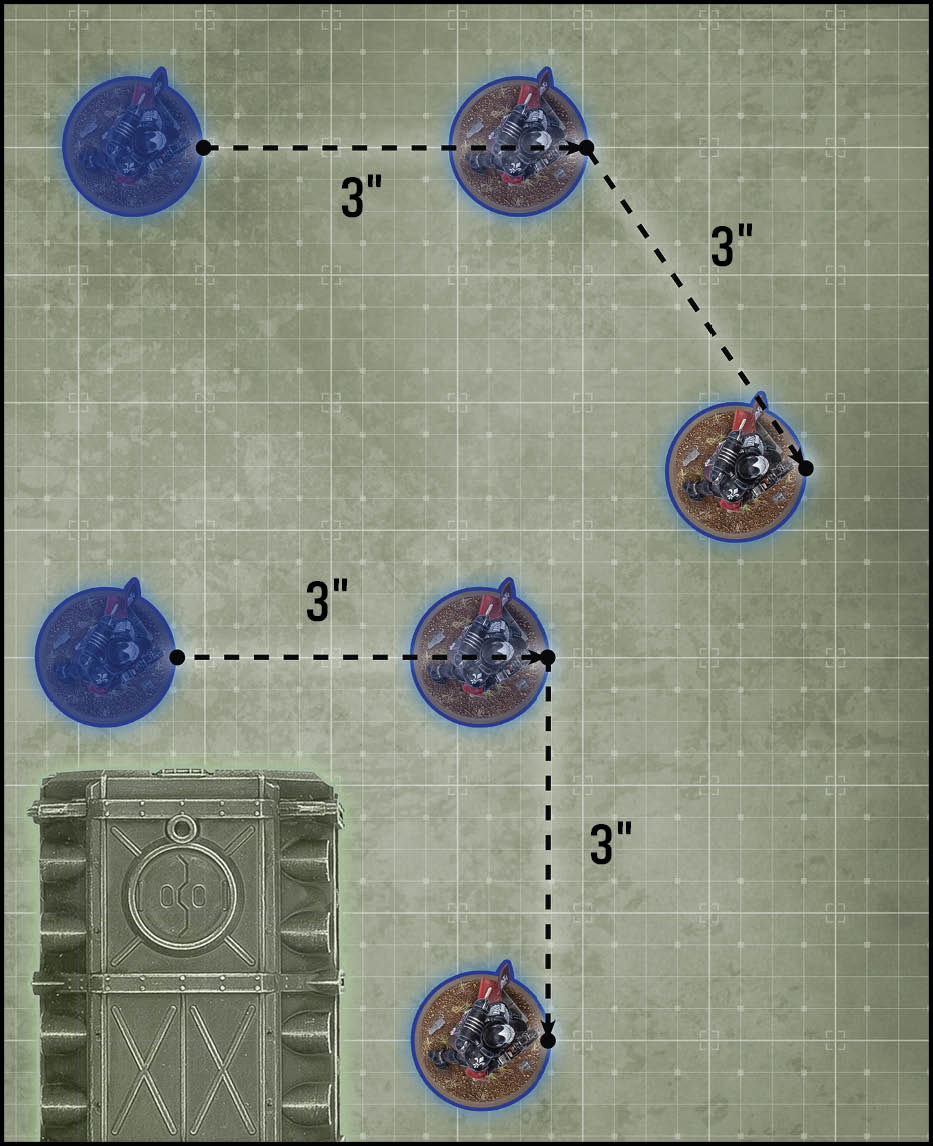
Both models shown here can move a *maximum distance* of 6". They both move 3" in a straight line, then 3" in another straight line, for a total movement of 6".
03.01.04 - When Moving Up To#
Some rules allow a unit to make a stated of up to X". That stated distance is the maximum distance for that move.
Rotating
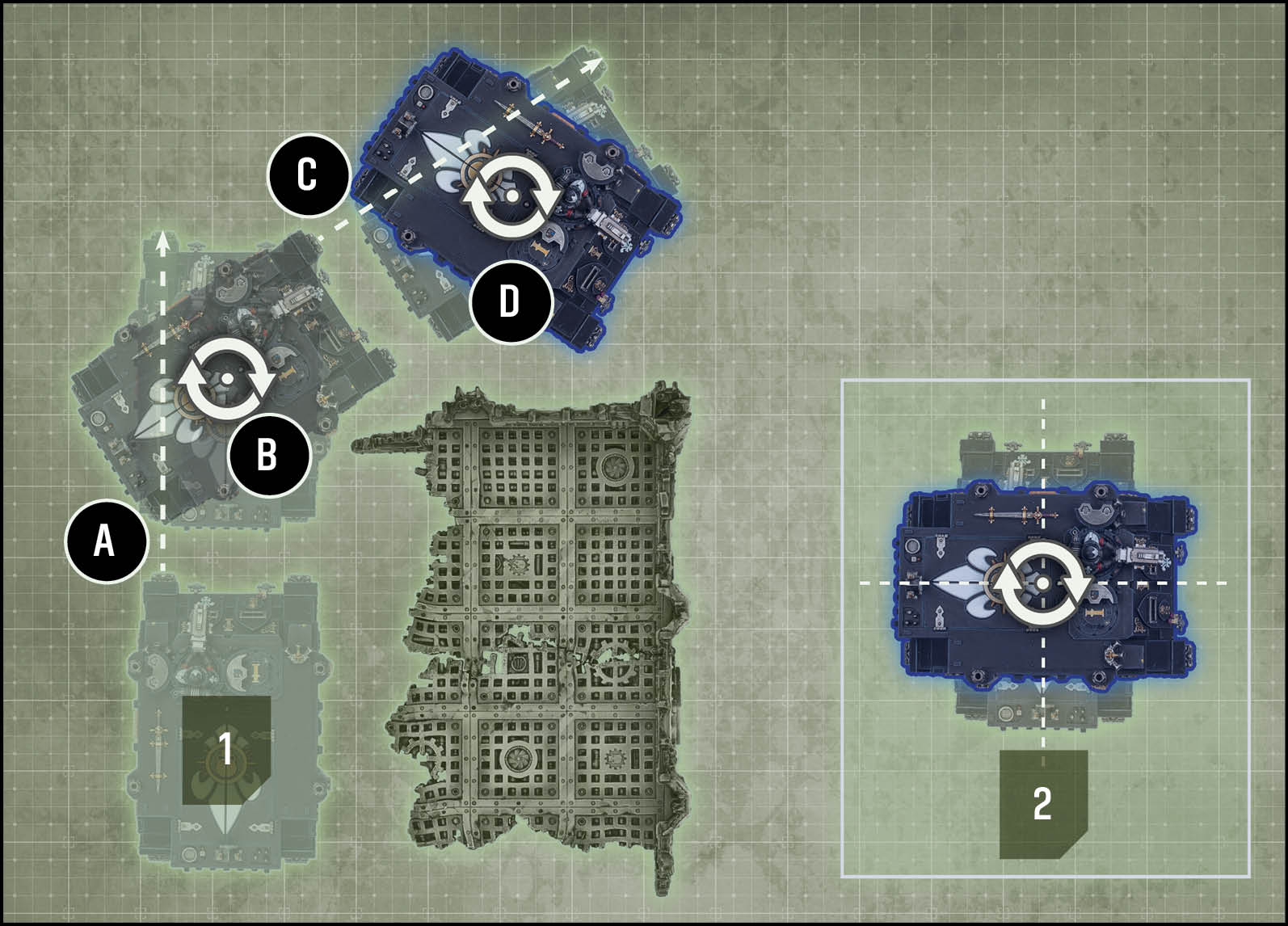
1. This model can move a *maximum distance* of 12". It moves in a series of straight lines and rotations, as follows:
*A)* Moves 6" in a straight line
*B)* Rotates
*C)* Moves 6" in a straight line
*D)* Rotates
This model has moved a total of 12".
2. Models without a base are rotated around their central axis (see Frame, 17.02).
03.02Set Up#
Before your units can move and make attacks, they will first need to be set up on the battlefield. This most commonly happens when deploying your army for battle, but can happen for other reasons as well.
Whenever a rule instructs you to set up a unit, place its models on the battlefield so that:
- That unit is in coherency (03.03).
- That unit is unengaged (03.04).
- All other requirements and restrictions are met.
If you cannot set up all of the models in a unit, remove that unit from the battlefield and return it to its original position (e.g. in strategic reserves or embarked within a TRANSPORT)
03.02.01 - If You Cannot Set Up a Unit#
While having to set up a unit as the result of a move type, if you have to return a unit’s models to their previous positions because it is not possible to set them all up, that unit has not been selected to move. This means it can be selected to move later, so could either attempt another set up or remain stationary (09.04).
03.02.02 - Setting Up Large Models#
If a model cannot meet all of its set up restrictions because it is too large, consult the relevant section below:
During Deployment: If a model is so large that its base cannot physically be set up wholly within your deployment zone, it must be set up so that it is touching your battlefield edge. During a turn in which such a large model is set up on the battlefield, that model’s unit cannot do any of the following:
- Make a normal/advance/fall-back/charge move.
- Make any attacks with ranged weapons.
Some large models, typically Aircraft, have wings and other parts that extend significantly beyond their base. Such models can overhang a deployment zone if it is not possible to set them up otherwise, but when setting them up, their base must still be wholly within that deployment zone.
From Strategic Reserves: If a model is so large that its base cannot physically be set up wholly within the distance required of the battlefield edge, it must be set up so that it is touching a battlefield edge. During a turn in which such a large model is set up on the battlefield, that model’s unit cannot do any of the following:
- normal/advance/fall-back/charge move.
- Make any attacks with ranged weapons.
Some large models, typically Aircraft, have wings and other parts that extend significantly beyond their base. Such models can overhang a battlefield edge if it is not possible to set them up otherwise, but when setting them up, they must still be more than 8" away from all enemy units.
Disembarking from a Transport: When a unit disembarks from a Transport, it must be set up wholly within 3" of that model. If a disembarking model is so large that it is not possible to set it up wholly within 3" (typically because it is itself larger than 3" in all directions), set that model up with its base within 1" of that Transport’s base (or hull), and not engaged with any enemy units.
03.02.03 - Redeployments#
When a player uses a rule that lets them redeploy their unit, they remove that unit from the battlefield, then deploy it again using all the normal rules (e.g. if all the models in the redeploying unit have the Infiltrators ability, that unit can be set up using that ability).
03.03Coherency#
A unit that contains more than one model must be set up and end any kind of move in coherency. A unit is in coherency while both of the following apply to every model in that unit:
- Within 2" horizontally and 5" vertically of at least one other model in that unit.
- Within 9" horizontally and 5" vertically of every other modelin that unit.
REGAINING COHERENCY
In the End of Turn step of each player’s turn, if one or more units on the battlefield are not in coherency, those units’ controlling players must remove models from them, one at a time, until they are in coherency again. Models removed in this way are destroyed, but they do not trigger rules that apply when a model is destroyed.
03.03.01 - What Is Coherency#
Coherency prevents models in the same unit from becoming too separated from each other while on the battlefield, ensuring they are set up and end every kind of move as a single group.
FAQ
QDo models destroyed when a unit is out of coherency count for mission objectives?
Yes.
QWhen checking coherency for my unit can my unit be in multiple groups?
No, it must be in a single contiguous group as per Units and Models (01.02) and What is Coherency in the core rules.
QWhen a move says that a model or unit must move in a way if it is able, can that requirement force the unit to end their move not in coherency?
No, when a model or unit is making a move it must follow requirements while ending that move in coherency
03.04Engagement#
A model’s engagement range is the area of the battlefield within 2" horizontally and 5" vertically of it.
- While a friendly model is within engagement range of one or more enemy models, those models – and the units they belong to – are engaged with each other.
- While a unit contains no engaged models, that unit is unengaged.
03.04.01 - What Is Engagement#
While opposing models are within each other’s engagement range, they are able to fight in vicious melee, so unless they are seeking to make melee attacks, models should keep out of their foes’ reach.
Coherency
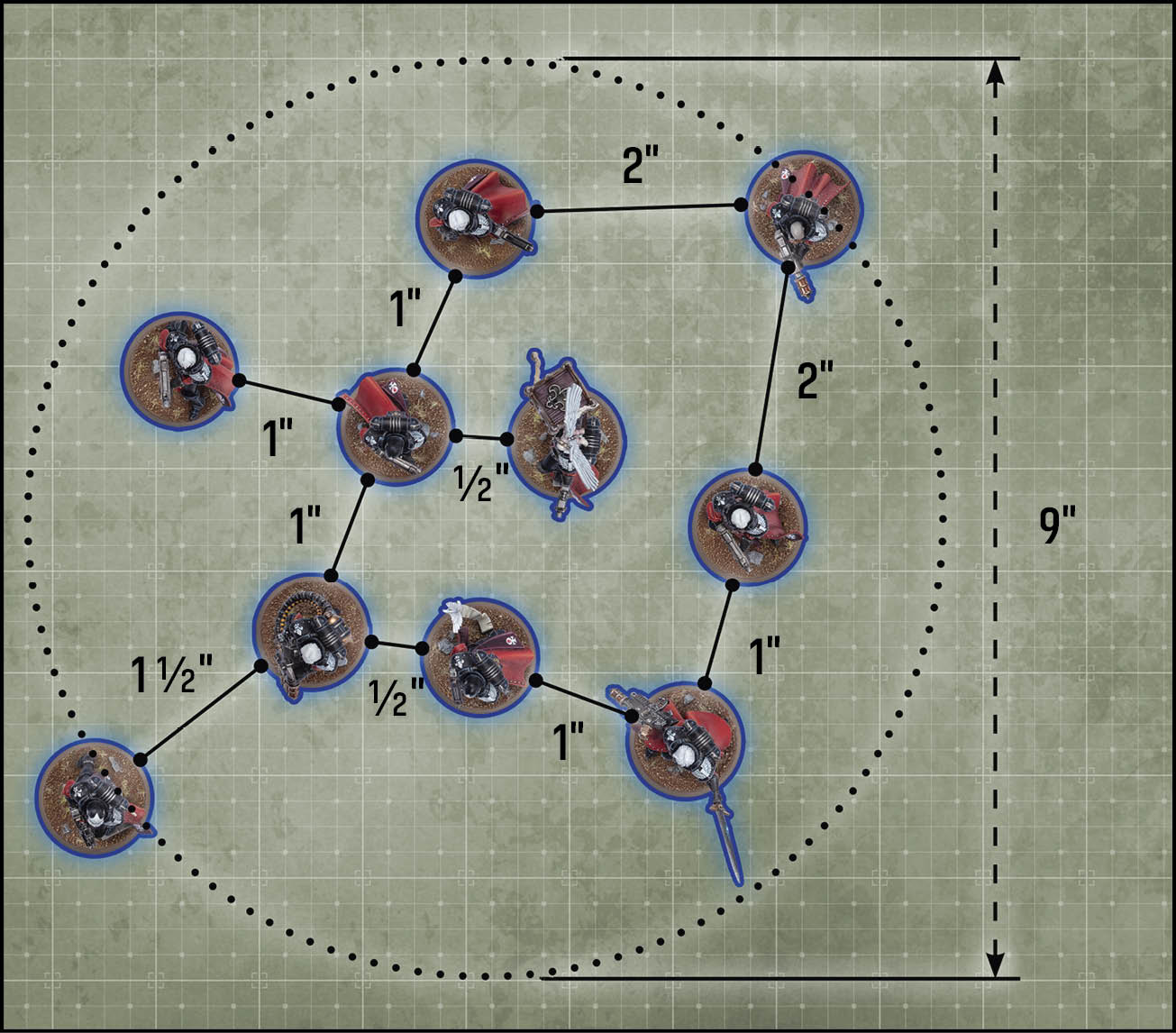
Every model in this unit is within 2" of at least one other model in its unit, and every model is within 9" of every other model in its unit. This unit is therefore in *coherency*.
Engagement
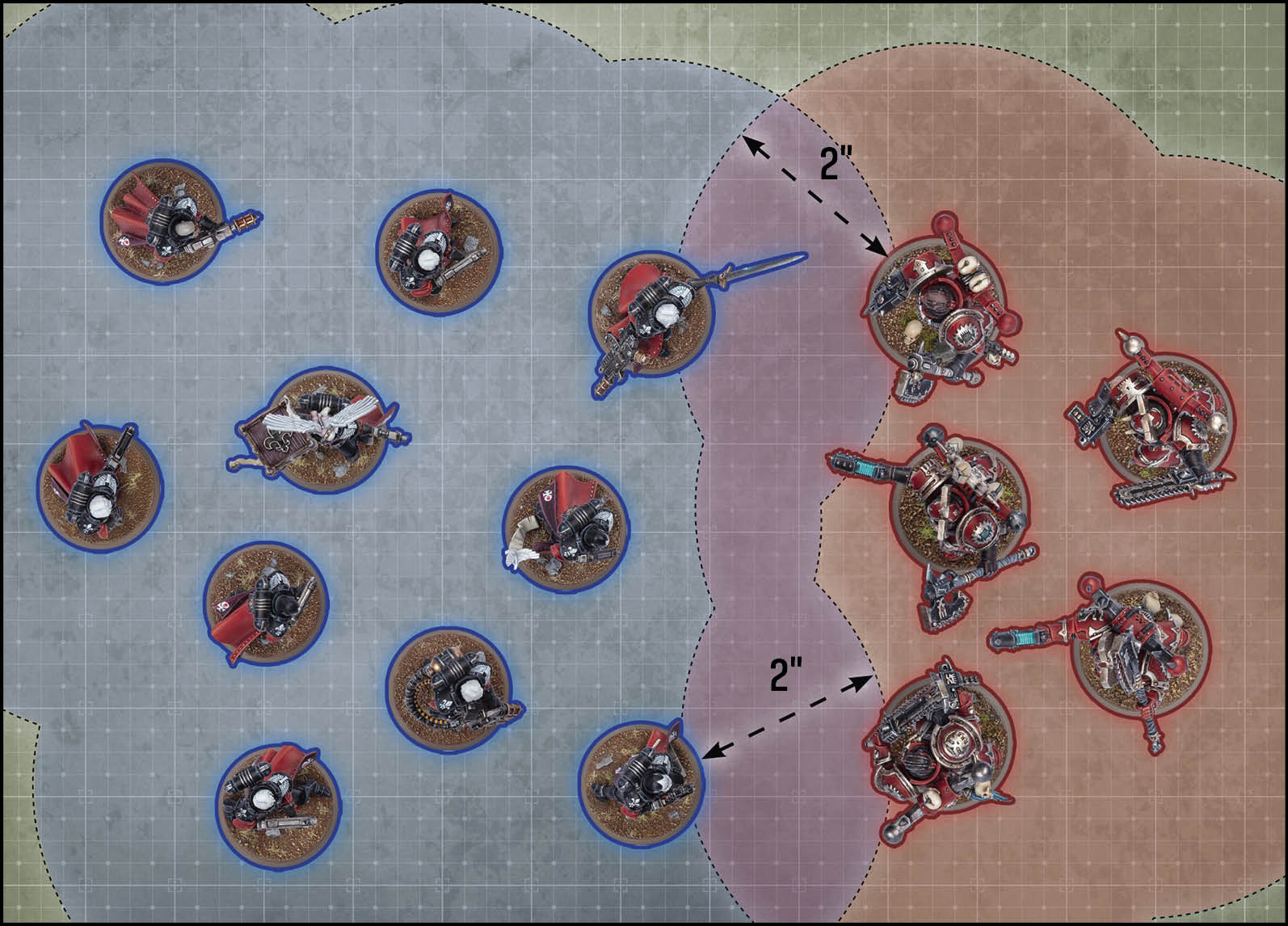
These two units have at least one model within 2" of the opposing unit, and are therefore *engaged* with each other.