Core Rules
13. Terrain
WTC1 ruling on this section
To see if a model with the Frame Keyword is Within or Wholly Within a terrain area, use the horizontal distance (i.e. the downward projection) only to the nearest part of the model, including its base.
13.00Terrain#
This section provides rules for using terrain to transform your gaming table into an interactive, thematic battlefield. These rules help to bring your battlefield to life and introduce a vital tactical dimension to your games.
13.01Placing Terrain#
Before the battle, place a selection of terrain features on the battlefield using one or more of the following methods:
- Place a well‑defined boundary (such as a base or mat) in each location you want to furnish with terrain, then place one or more terrain features wholly within that boundary.
- Place one terrain feature directly on the battlefield.
- Place two or more terrain features directly on the battlefield in such a way that together they define the boundary of an area.
In each case, the area of the battlefield occupied by that boundary or terrain feature is known as a terrain area. A mission’s deployment map may define the location and dimensions of each terrain area. Otherwise, players must agree on this before the battle.
FAQ
QAre models that are within the boundary of a terrain area, but not on the ground floor of a terrain area (e.g. overhanging parts of FRAME VEHICLES or models on terrain features that are within that terrain area) within that terrain area?
13.02Terrain Categories#
Each terrain feature belongs to a terrain category, which can affect the movement and visibility of models. Below are some examples of which types of terrain features fall under each category.
A mission’s deployment map may define which terrain categories should be present within each terrain area. Meeting these requirements will create the best gaming experience. Note that terrain features sharing the same terrain area can belong to different terrain categories.
13.02.01 - Creating Your Own Battlefield#
Don’t worry if your battlefield doesn’t match a mission’s terrain category requirements; just do the best with the terrain features you have. If a mission does not provide you with guidance, it will be up to the players to decide how to create their battlefield. When doing so, keep in mind that dense terrain features have the greatest impact on visibility and movement. Battlefields with too few dense terrain features can advantage armies that rely on shooting, or disadvantage armies that rely on melee. Also remember to leave sufficient room around dense terrain features for larger models such as MONSTERS/VEHICLES to manoeuvre, especially near the edges of the battlefield.
Terrain Placed on a Mat
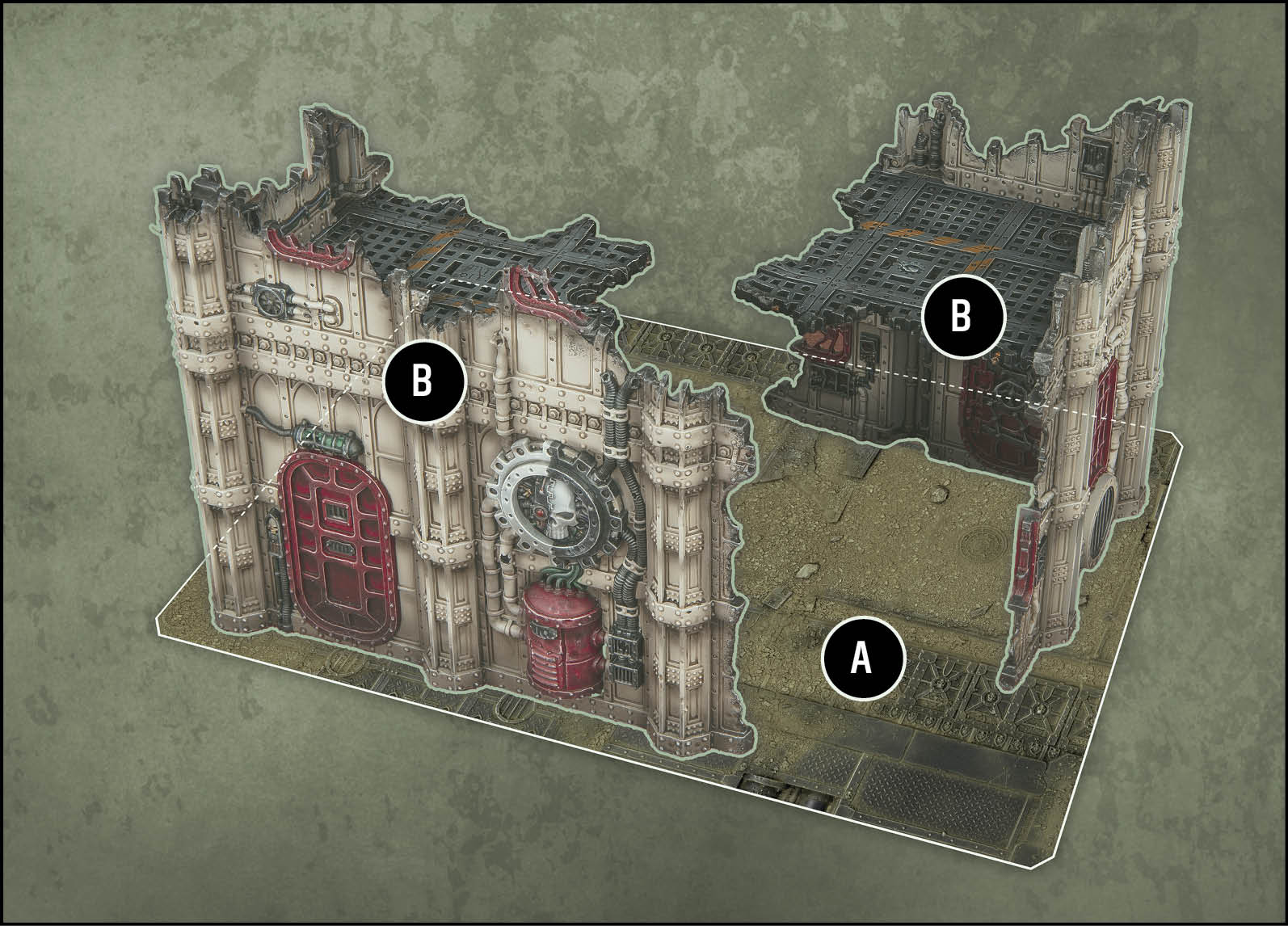
Two *terrain features* have been placed on a mat. The edges of this mat define the boundary of this *terrain area (A)*. Both *terrain features (B)* are ruins, so use the rules for *dense terrain features*.
Terrain Placed on a Battlefield
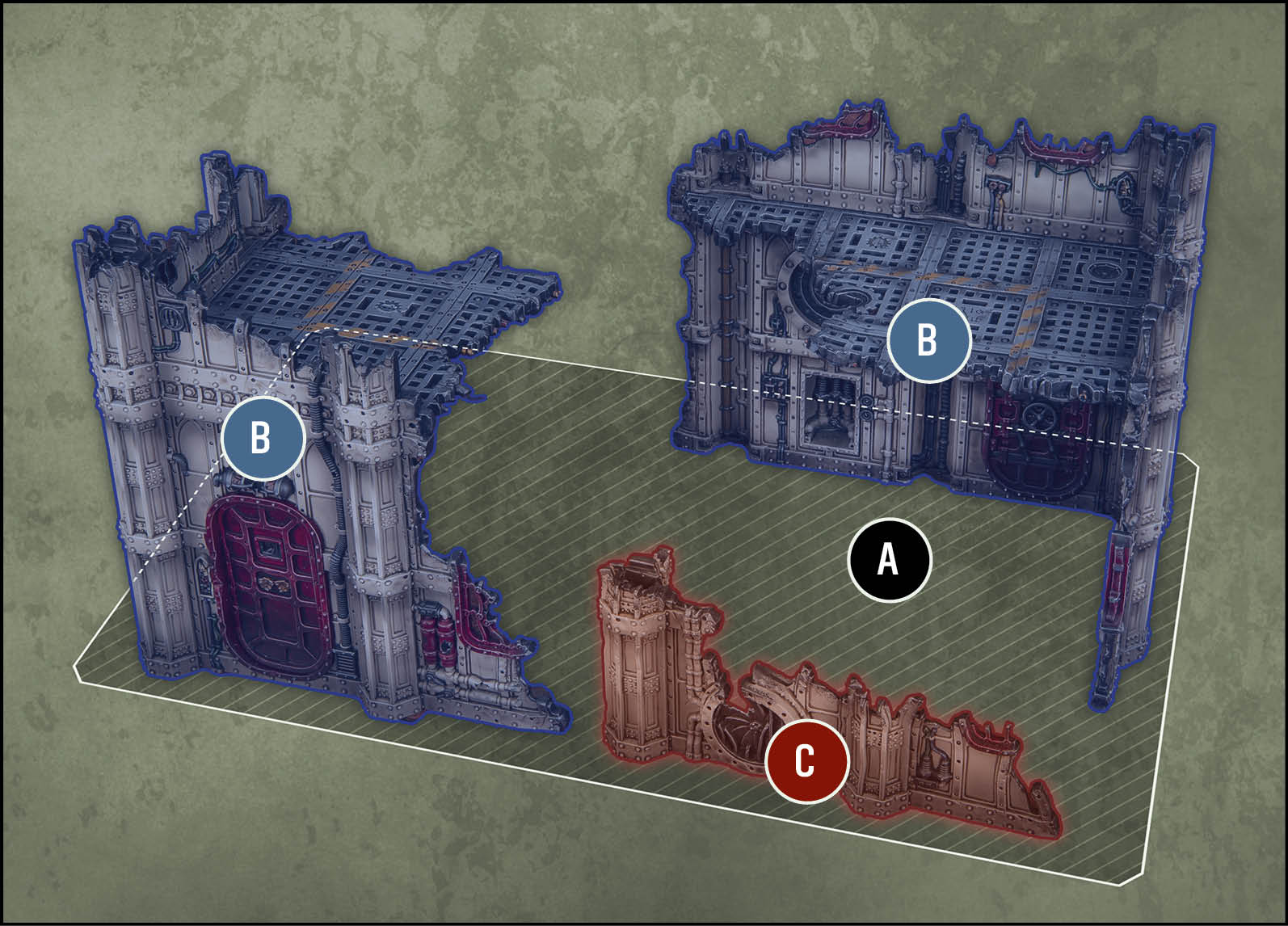
Three *terrain features* have been placed directly on the battlefield. The players have agreed on the boundary of the *terrain area (A)* defined by these features (the shaded rectangle). The BLUE features *(B)* are *dense terrain features* and the RED feature *(C)* is a *light* *terrain feature*.
13.03Exposed Terrain#
Exposed terrain offers only scant protection to the most desperate troops, and can be traversed without hindrance.
Examples: Craters, razorwire, scattered debris.
13.04Light Terrain#
Light terrain can provide cover from incoming attacks, but will not slow an enemy’s advance or offer lasting defence.
Examples: Barricades, low walls, statuary.
13.05Dense Terrain#
Dense terrain is an obstacle to even the largest war machines, and can shelter entire squads from enemy sight.
Examples: Buildings, ruins, armoured containers, woods.
13.06Terrain And Movement#
Models can move through different categories of terrain feature as follows:
- Exposed/Light: All models can move horizontally and vertically through exposed and light terrain features.
- Dense:
- INFANTRY/BEASTS/SWARM/MOBILE models can move horizontally through dense terrain features.
- INFANTRY/BEASTS/SWARM models can move vertically through dense terrain features.
- Other models can move horizontally through dense terrain features provided that all sections of that terrain feature that the moving model’s base would move through are 2" or less in height. Otherwise, the moving model must move vertically to ascend or descend such sections. They cannot move through ceilings and floors while doing so, and they cannot end that move on any surface of that terrain feature that is not on ground level (see below).
MOVING VERTICALLY
Models can move vertically to ascend or descend terrain features. While doing so:
- That model must remain within ½" horizontally of that terrain feature.
- Add the distance moved vertically up, and the distance moved vertically down, to any other distance that model has moved since its unit began that move.
SETTING UP OR ENDING A MOVE
Models can be set up or end a move on the ground level of terrain features. Models can also be set up or end a move on any surface of a terrain featurethat is not on ground level, if all of the following apply:
- That model has one or more of the following keywords: INFANTRY/BEASTS/SWARM/FLY/MONSTER.
- After ending that move, that model is stable and no part of its base overhangs the outer edge of that surface.
13.06.01 - Solid Terrain and Movement#
If a terrain feature has the Solid rule (13.11), as dense terrain features do, a model cannot end a move such that any part of it is through any enclosed part of that terrain feature that is 3" or less from ground level – not even through small openings such as doors and windows. This ensures that protruding elements of models cannot be used to circumvent the visibility restrictions of the Solid rule.
Terrain and Movement
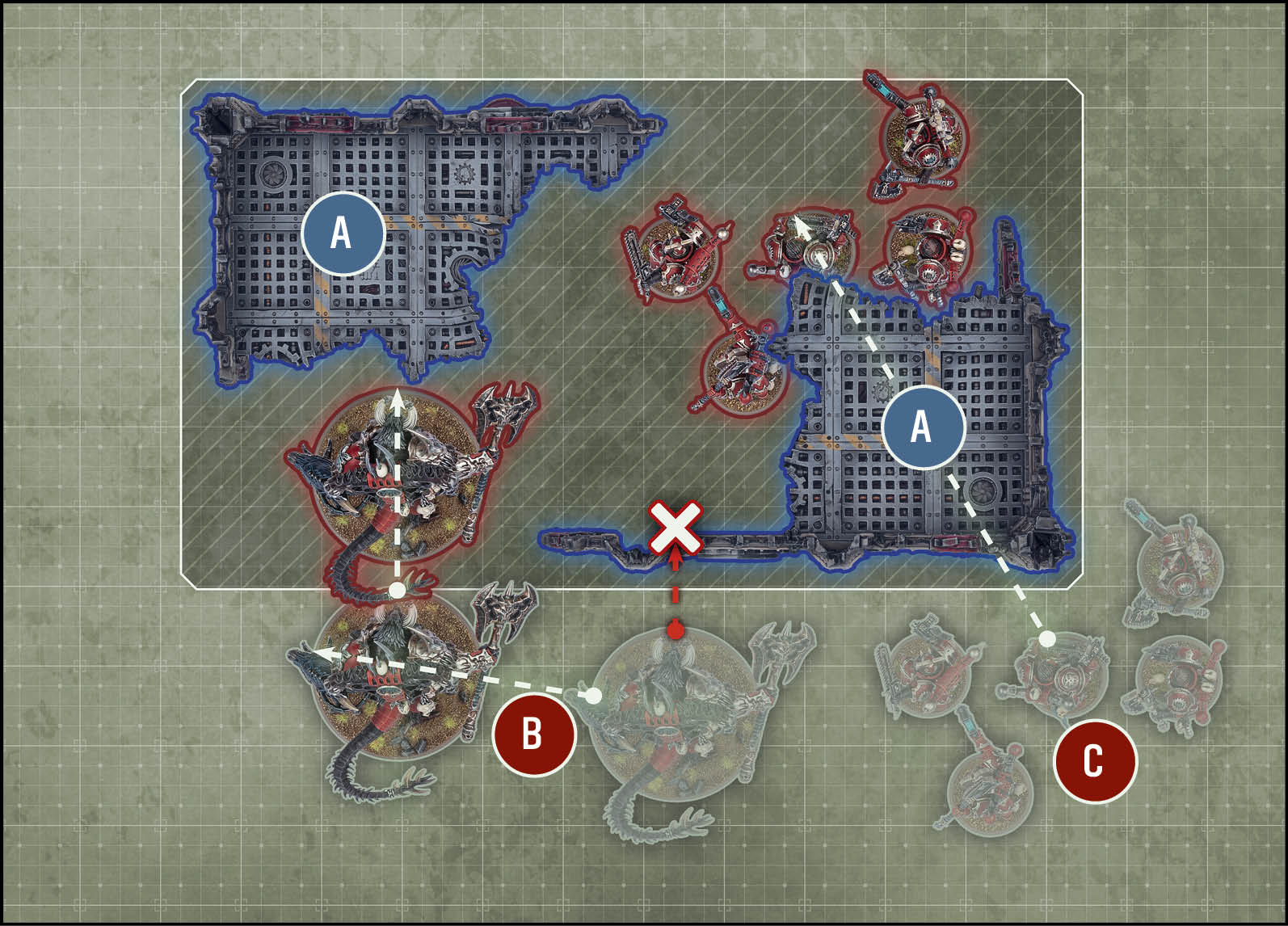
All sections of the *dense* *terrain feature (A)* are more than 2" in height, so the Monster model *(B)* cannot move through it and must move around it instead.
The Infantry models *(C)* can move through *dense terrain features*, such as the walls of this ruin.
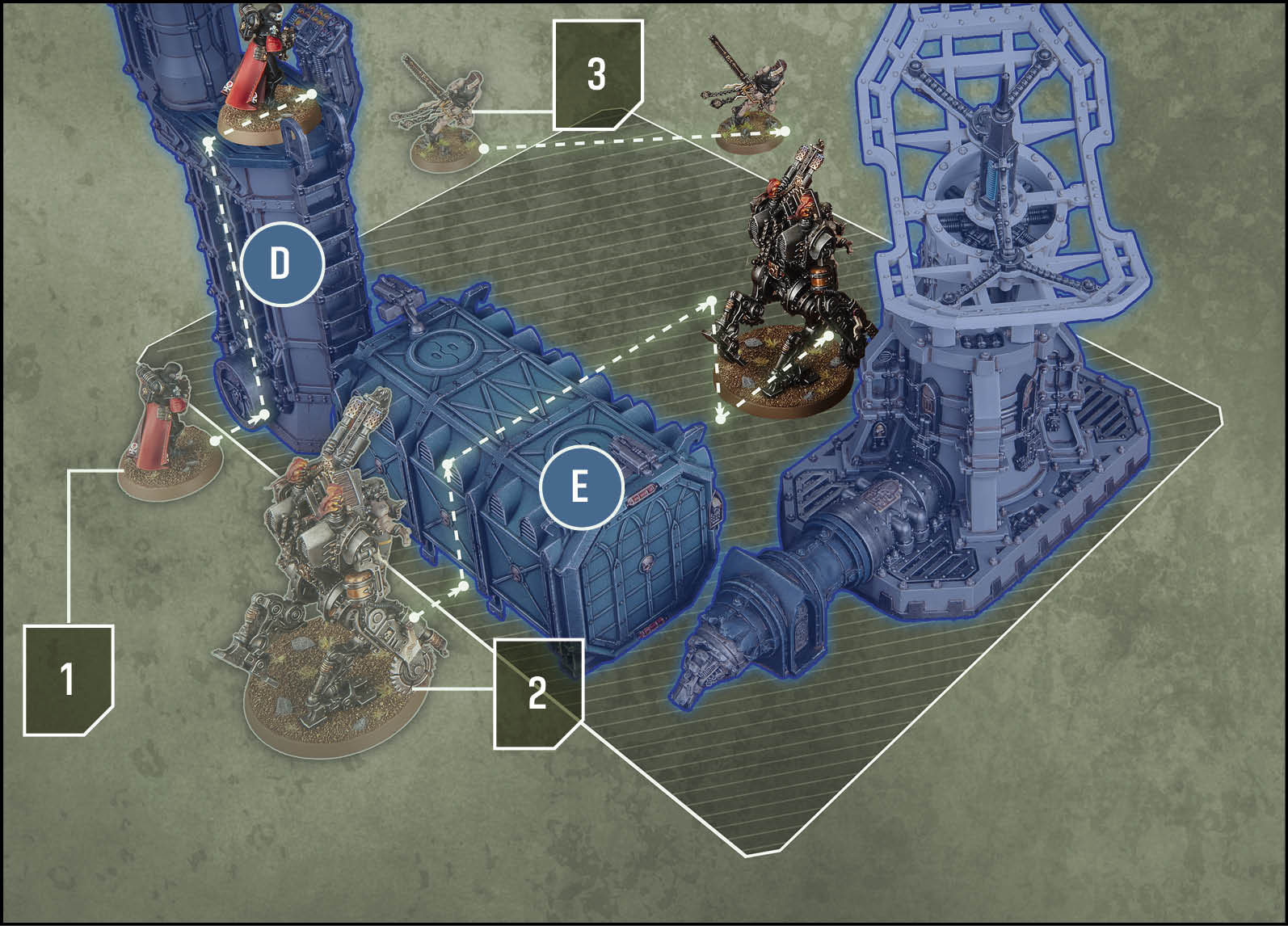
1. This Infantry model can move vertically and end its move on the top surface of the *terrain feature (D)*, as it is stable and no part of its base overhangs the outer edge of that surface.
2. This Vehicle model cannot move through the *dense* *terrain feature (E)*, but It can move vertically to ascend and descend sections that are more than 2" in height (provided it does not end that move on top of such sections).
3. This INFANTRY model is not being moved over or through any *terrain features*. Its move through the *terrain area* shown is therefore unimpeded.
13.07Terrain And Visibility#
Terrain can affect visibility, depending on whether the Benefit of Cover, Hidden, Obscuring or Solid rules apply.
13.08Benefit Of Cover#
Each time a ranged attack targets a unit, if every model in that unit meets one or more of the following conditions, that unit has the benefit of cover against that attack:
- That model has the INFANTRY/BEASTS/SWARM keyword and is within a terrain area.
- That model is not fully visible to the attacking model due to one or more intervening terrain features and/or one or more intervening obscuring terrain areas (13.10).
Each time a ranged attack targets a unit that has the benefit of coveragainst it, worsen the BS characteristic of that attack by 1.
Benefit of Cover
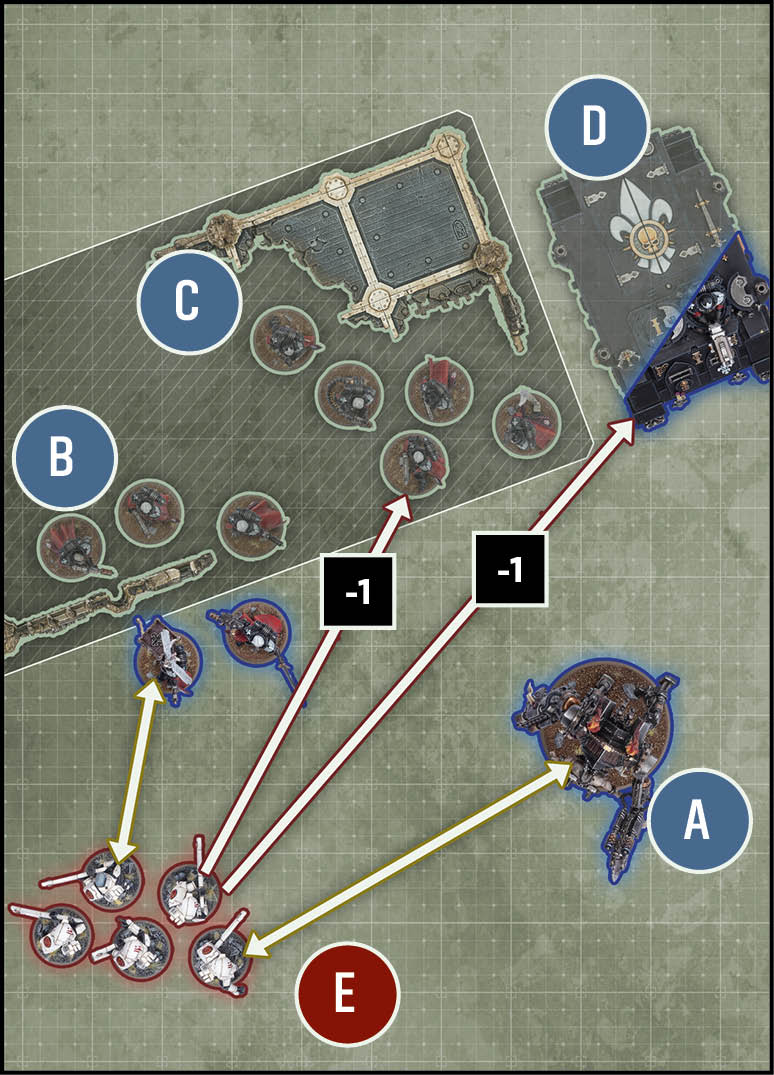
When Unit *E* makes ranged attacks:
• Unit *A* is *fully visible* to every model in Unit *E*, so does not have the *benefit of cover*.
• Not all of the models in unit *B* are within a *terrain area*, so unit *B* does not have the *benefit of cover*.
• All of the models in unit *C* are within a *terrain area*, so unit *C* has the *benefit of cover* (-1 BS).
• Unit *D* is not *fully visible* to unit *E* due to an intervening *obscuring* *terrain area*, so unit *D* has the *benefit of cover* (-1 BS).
FAQ
QWhen my unit shoots at another unit, how does it work if some models in the target unit are fully visible to some models in my unit, while others are within a terrain area/not fully visible?
For each attacking model in your unit, determine whether the target unit has the benefit of cover, as described in Terrain and Visibility. In this scenario, the target unit will likely have the benefit of cover against some of the attacking models, but not all.
This means that, in an example unit where all attacking models are using the same weapon, when you get to the Resolve Attacks step of the Attack Sequence, you will collect dice for attacks made by models against which the target unit has the benefit of cover separately from the dice for attacks made by models against which the target unit does not have the benefit of cover.
13.09Hidden#
A model is hidden while all of the following apply to it:
- That model has the INFANTRY/BEASTS/SWARM keyword and is within a terrain area that contains one or more light/dense terrain features.
- That model’s unit did not make one or more ranged attacks during this turn or during the previous turn.
While a model is hidden, it can only be visible to enemy models that are within its detection range. Unless otherwise stated, a model’s detection range is 15".
13.09.01 - Hidden and the First Turn#
During the first turn, conditions that require something not to have happened during the previous turn are true. For the Hidden rule, this means that during the first turn a unit has not made ranged attacks during the previous turn.
FAQ
Errata13.09 - Change to First Bullet Point
Change to: 'That model has the INFANTRY/BEASTS/SWARM keyword and is within a terrain area that contains one or more light/dense terrain features.'
13.10Obscuring#
Terrain areas containing one or more light or dense terrain features are obscuring terrain areas. If every line of sight drawn between two models crosses one or more obscuring terrain areas (excluding obscuring terrain areas that one or both of those models are within), those two models are not visible to each other.
Hidden and Obscuring
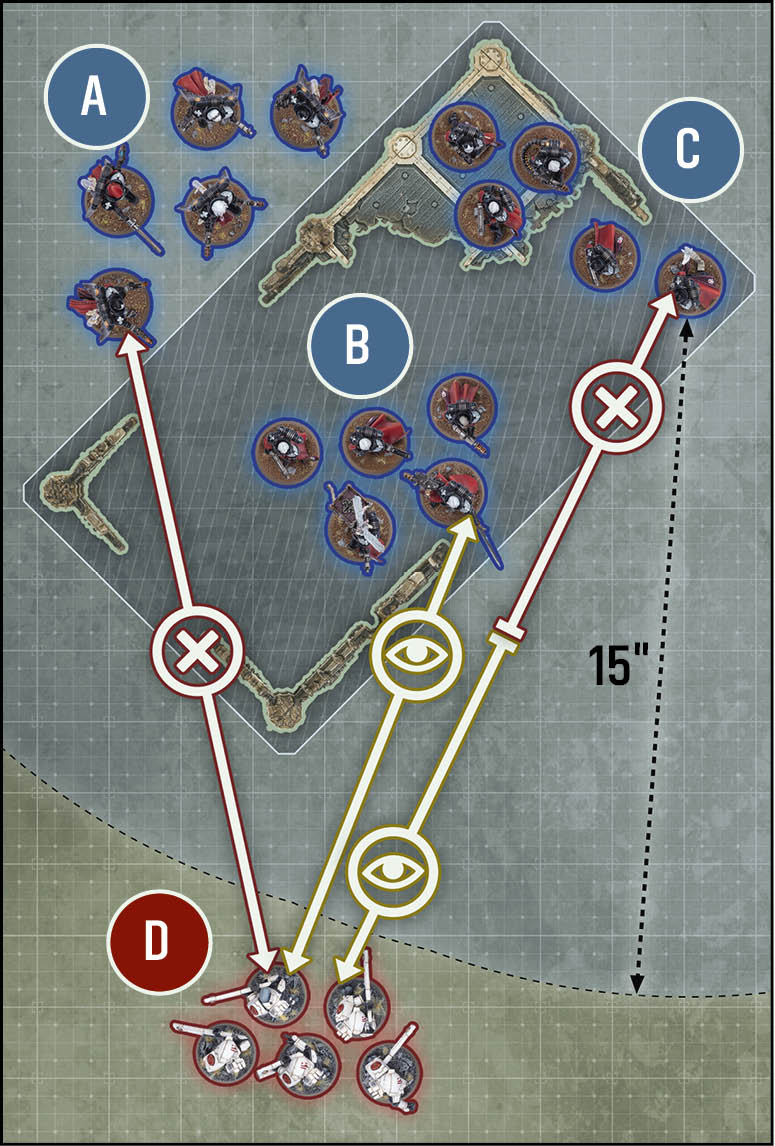
• There is an *obscuring* *terrain area* between all models in units *A* and *D*, so none of them are *visible* to each other.
• All models in units *B* and *C* are within the *terrain area* and are Infantry, so are *hidden*. However, unit *D*’s models are within the 15" *detection range* of unit *B*’s models (but not unit *C*’s), so unit *B*’s models are *visible* to unit *D*’s. Unit *D*’s models are also *visible* to the models in units *B* and *C*, since they are not within a *terrain area*.
13.11Solid#
Dense terrain features have the Solid rule. Line of sight cannot be drawn across any enclosed gap in the surface of such a terrain feature that is 3" or less from ground level.
Designer’s Note: This rule ensures that models are not visible while sheltering in ground-level terrain, irrespective of small openings such as doors, windows or bullet holes, or because of small gaps between adjacent terrain features. 3" is the height of the first floor of many terrain features, but some missions may adjust the height at which this rule takes effect.
13.11.01 - Gone to Ground#
Hidden models that are concealed by dense terrain features gain an extra benefit while they have gone to ground.
A model has gone to ground while all of the following apply:
- That model is hidden.
- That model is not fully visible to the attacking model due to one or more intervening dense terrain features.
- That model’s unit did not make one or more ranged attacks during this turn or during the previous turn.
While a model has gone to ground, subtract 3" from that model’s detection range.
Designer’s Note: Units that made ranged attacks in the current or previous turn cannot go to ground, regardless of any abilities that allow them to shoot and remain hidden.
Solid
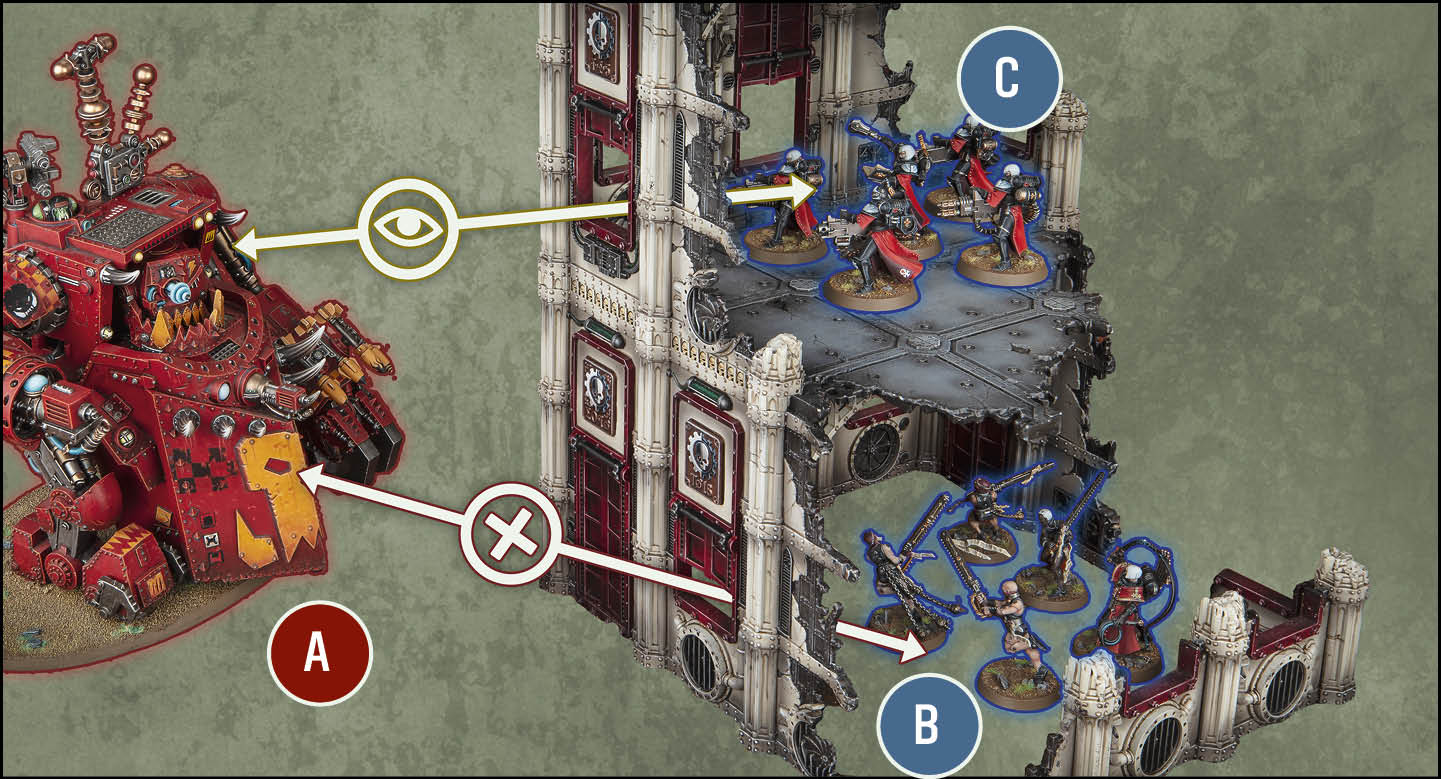
Units *A* and *B* are not *visible* to each other, because even though there is a window in this *dense* *terrain feature*, it has the *Solid* rule, so *line of sight* cannot be drawn through such enclosed gaps that are 3" or less from ground level.
Units *A* and *C* are *visible* to each other, because even though this *dense* *terrain feature* has the *Solid* rule, *line of sight* can be drawn normally through enclosed gaps that are more than 3" from ground level.